MCPE ActualGuns 3D
Skip to DownloadActualGuns 3D adds a variety of realistic firearms to Minecraft Bedrock Edition, enhancing gameplay with 3D models and complex mechanics.
Description
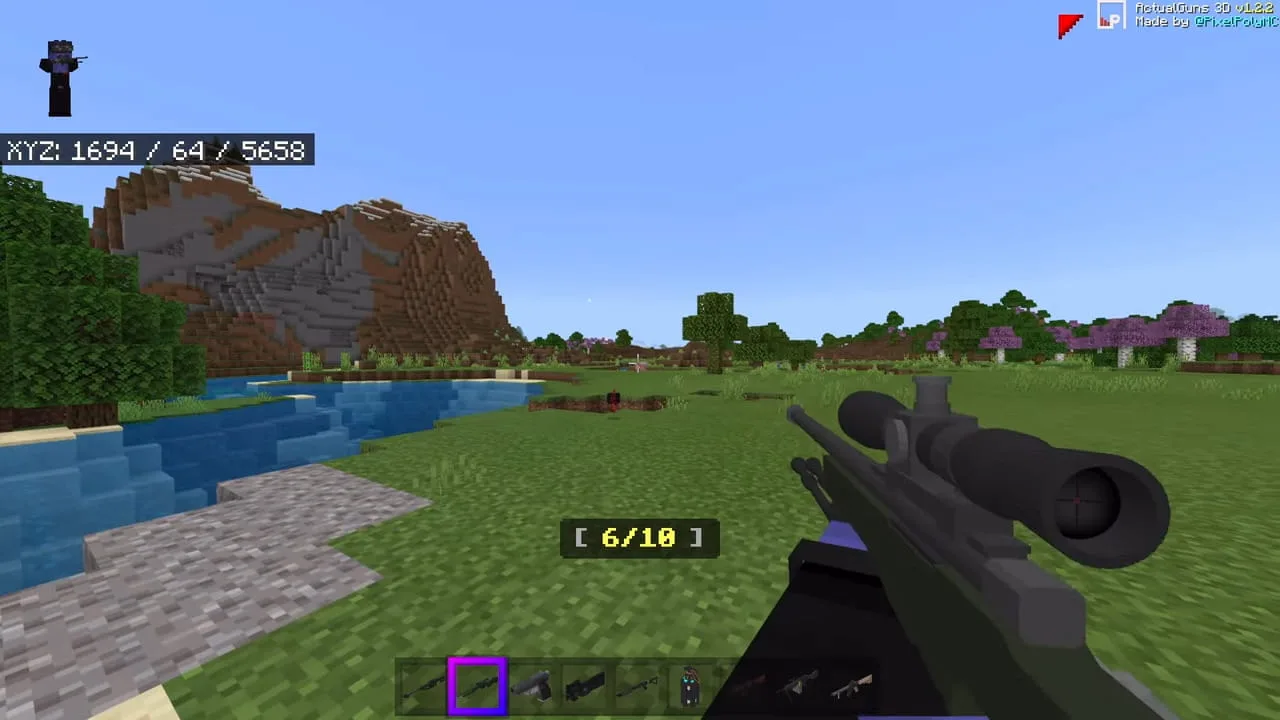
ActualGuns 3D is a powerful and creative addon for Minecraft Bedrock Edition that introduces an extensive array of firearms, all crafted with stunning 3D models and intricate mechanics. This addon fundamentally alters the traditional gameplay, allowing players to engage in more realistic combat scenarios within the blocky world of Minecraft. With ActualGuns 3D, you'll find a dynamic range of weapons available, including everything from pistols to assault rifles, shotguns, and sniper rifles. Each weapon comes with its unique design, damage output, and usability, enhancing the player's combat experience.
One of the standout features of ActualGuns 3D is the realistic approach it takes towards firearms. Unlike standard Minecraft, where combat is primarily melee or reliant on bows and arrows, this addon introduces a more professional combat vibe. Players can immerse themselves in intense battles against mobs, making strategies that involve quick thinking and precision shooting. For instance, using a shotgun might be ideal for close-quarters combat, while a rifle can provide long-range advantages, allowing players to engage enemies from a safe distance.
The addon emphasizes not just weaponry but a whole new combat mechanism. Players will find that each gun in ActualGuns 3D has unique firing patterns and reload times, requiring players to adapt to the rhythm of their weapon. This mechanic brings an extra level of engagement, where players need to be mindful of their ammo count and the timing of their shots in the heat of battle.
Moreover, ActualGuns 3D implements an innovative ammunition system that enhances gameplay. Players will have to craft different types of ammo for their guns, which can include various materials found in the world. This crafting system adds another layer of complexity, making it essential for players to manage their resources wisely. For example, while gathering materials for ammunition, players might also encounter mobs that pose a threat, thus requiring them to strategize effectively between gathering resources and entering into combat.
The mechanics of ActualGuns 3D are tailored specifically for Bedrock Edition, meaning all features behave differently than what might be expected from other platforms. This is important because players need to be aware that while the visual experience is heightened with 3D models, the core game mechanics have been optimized to ensure compatibility with Bedrock's unique systems. The operating mechanisms work smoothly, allowing players to integrate this addon seamlessly into their gameplay.
To install ActualGuns 3D, players will find the process straightforward.
- First, download the addon file from a trusted source and ensure it is meant for Minecraft Bedrock Edition.
- In Minecraft, navigate to the 'Settings' menu and proceed to 'Storage'.
- From there, select 'Resource Packs' and import the downloaded file.
- Make sure to activate the imported resource pack in your desired world settings.
- Next, go back to 'Settings' and select 'Behavior Packs' to import the corresponding behavior pack for the resource pack.
- After completing these steps, players can either create a new world or enter an existing one to start using the weapons from ActualGuns 3D.
Once installed, players can access the new firearms from the creative inventory or, for survival mode, craft them with the appropriate resources. Diving into the gameplay with ActualGuns 3D introduces players to an exhilarating blend of creativity and strategy, making it a must-try for anyone looking to elevate their Minecraft experience.
About the Content
ActualGuns 3D is a comprehensive addon for Minecraft Bedrock Edition that introduces a wide range of firearms capable of changing how players engage with the game. This addon features realistic weapon designs, including multiple types of guns such as handguns, rifles, and shotguns, all crafted with 3D models and specific animations for each. With ActualGuns 3D, players can immerse themselves in a more action-oriented experience, allowing for innovative combat strategies and creative gameplay.
CHANGELOG:
- Initial release featuring a variety of weapons
- Included realistic firing sounds for each gun
- Added customizable ammunition types
- Enhanced weapon damage mechanics
- Fixed numerous bugs affecting gameplay
- Improved visual models for better aesthetics
- Added ammunition crafting recipes
The addon is designed not only for those seeking a more intense gaming experience but also caters to builders and map creators. Players can utilize these weapons to design custom scenarios, PvP arenas, and survival challenges, providing endless opportunities for creativity.
Another significant feature of ActualGuns 3D is its incorporation of ammo management systems. Each weapon requires specific ammunition types, which introduces an extra layer of strategy to survival gameplay. For instance, players must gather resources to craft ammunition using materials available in the game. This aspect rewards exploration and resource gathering, which are core mechanics in Minecraft. With this system, players need to think critically about their inventory management during combat, adding tension and depth to encounters.
To maximize the effectiveness of the addon, players should be aware of the limitations tied to Bedrock Edition. Unlike some versions of Minecraft, Bedrock doesn’t support certain modifications that could enhance the usability of the guns. This means that while players can enjoy the 3D gunplay, they won't be able to modify the behavior of the guns beyond what's included in the addon. It's integral to understand these mechanics to have a fulfilling experience with ActualGuns 3D.
The installation process for ActualGuns 3D is straightforward, making it accessible even for those new to addons. Players should start by downloading the addon file from a reliable source, ensuring they are getting the most updated version to access all the latest features. Once downloaded, follow these steps:
- Open Minecraft Bedrock Edition and navigate to the 'Settings' menu.
- Select 'Storage' and then 'Resource Packs' to import the downloaded addon file.
- After importing, ensure to activate the resource pack in your world settings.
- Go back to the 'Settings' menu, then select 'Behavior Packs' and import the behavior pack that corresponds with the resource pack you just added.
- Finally, create a new world or enter an existing world to enjoy the features of ActualGuns 3D.
Players should note that once the addon is installed, weapons can be found in the creative inventory or crafted using specific recipes outlined within the addon. In survival mode, acquiring these weapons and their respective ammunition will significantly enhance gameplay and provide a fresh experience for seasoned players. This addon not only transforms the combat system but also provides new elements of strategy, planning, and construction for dedicated Minecraft enthusiasts.
Installation
To install ActualGuns 3D, follow these straightforward steps to ensure it works correctly on your Minecraft Bedrock Edition:
1. **Download the Addon**: Find and download the ActualGuns 3D addon file from a reputable source. Make sure it’s compatible with Minecraft Bedrock Edition.
2. **Open Minecraft**: Start your Minecraft Bedrock Edition and go to the main menu.
3. **Access Settings**: Click on ‘Settings’ situated in the menu. This will open a new settings window where you can manage various aspects of your game.
4. **Navigate to Storage**: From the settings, select ‘Storage’. This section shows options for both Resource Packs and Behavior Packs.
5. **Import Resource Pack**: Choose ‘Resource Packs’, then click on the ‘Import’ option to add the downloaded ActualGuns 3D resource pack. Confirm the action to complete the import.
6. **Import Behavior Pack**: After importing the resource pack, return to 'Storage' and select 'Behavior Packs'. Once again, click on ‘Import’ to add the behavior pack that corresponds with the resource pack you have just imported.
7. **Activate Packs**: Ensure both the resource and behavior packs are activated. You can do this by clicking on the respective packs and selecting ‘Activate’. This step is crucial for the addon to function properly in your gameplay.
8. **Create or Enter a World**: Whether you’re creating a new world or entering an existing one, ensure you enable the packs you just imported during the world creation or modify it in the world settings.
9. **Locate the Weapons**: In Creative Mode, the firearms will be available in your inventory. In Survival Mode, you’ll be able to craft the guns using specific resources as detailed in the addon.
10. **Enjoy the Gameplay**: Explore your new arsenal and adapt your strategies as you engage in combat using the various firearms from ActualGuns 3D. Experience a fresh and exciting twist to combat in Minecraft!
Supported Minecraft Versions
1.21
If the download button doesn't work, click here for alternatives
If you are the original creator and would like this content removed, please submit a request through our DMCA page.