MCPE Prehistoric Dominion
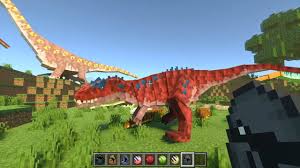
Skip to DownloadForge your own Jurassic legacy! Prehistoric Dominion is a unique addon inspired by Jurassic World: The Game and Evolution 2, blending their iconic creature skins and management style with classic paleontology for the ultimate park-building toolkit in Mine

Loading video...
Description
Step beyond the movie script and into the role of a park architect with Prehistoric Dominion. This innovative addon draws its core inspiration from the vibrant world of Jurassic World: The Game and the sophisticated management of Evolution 2, while also tipping its hat to the beloved Fossil and Archeology mod. The result is a fresh, gameplay-focused experience that empowers you to design your own narrative.
Instead of following a film plot, you're given a vast toolbox of creatures, many featuring the distinct and colorful skins from the mobile game. This addon is designed for builders and visionaries who want to construct their own unique prehistoric empire, manage ecosystems, and experiment with genetics, all within the familiar blocks of Minecraft.
About the Content
Prehistoric Dominion is a curated celebration of Jurassic World's extended universe, designed for players who love the creative and management aspects of the franchise. It stands apart by prioritizing the visual flair and strategic depth found in the games rather than the linear stories of the films.
A Hybrid Inspiration: The Best of All Worlds
This addon is a melting pot of the best ideas from several iconic sources, creating a uniquely rich experience:
From Jurassic World: The Game: We've incorporated a wide array of the vibrant and sometimes exotic creature variants that made the mobile game so visually engaging. Expect to see dinosaurs with unique color patterns and designs that go beyond realistic paleontology, offering a more fantastical and customizable park aesthetic.
From Jurassic World Evolution 2: The spirit of park management is core to this addon. While not a direct port, it encourages you to think like a manager. You'll need to consider habitat needs, creature compatibility, and guest safety, translating the tycoon-game feel into Minecraft's sandbox.
From Fossil and Archeology: We pay homage to this classic mod by incorporating a "little bit" of its beloved paleontology mechanics. This might involve a system where players can excavate fossils and use them to create dinosaurs, adding a layer of scientific discovery and progression that deeply engages players in the process of de-extinction.
Your Park, Your Rules:
The goal of Prehistoric Dominion is to provide the assets and systems for limitless creativity. The addon provides the building blocks—a diverse bestiary with unique looks, mechanics that encourage thoughtful park layout, and a nod to the science of paleontology. What you build with these tools is entirely up to you. Will you create a safe, educational park for visitors, a chaotic ecosystem where only the strong survive, or a high-tech facility pushing the boundaries of genetic modification? Prehistoric Dominion gives you the freedom to answer that question yourself.
Installation
Building Your Dominion: A Setup Guide
Ready to lay the first fence of your new park? Getting Prehistoric Dominion up and running is a simple, three-step process.
Step 1: Secure the Blueprints
Your first task is to acquire the addon file. Click the download link on this page to get the Prehistoric_Dominion.mcaddon package onto your device.
Step 2: Install the Foundation
Find the file you just downloaded—it's your project's foundation. To install it, just give it a double-click (or a tap on mobile). A menu will pop up; from this list, select Minecraft. The game will open and automatically take care of the rest, unpacking all the necessary parts into the right places. Easy!
Step 3: Power Up Your Park
The addon is now on your device. To bring it to life in your world, you need to flip the "on" switch. Go into the settings for your chosen Minecraft world. Look for the 'Behavior Packs' section, find "Prehistoric Dominion," and hit 'Activate'. Don't skip this next part! You must also go to the 'Resource Packs' menu and activate the "Prehistoric Dominion" pack there as well. This ensures all the dinosaurs and decorations look exactly as they should.
Step 4: Break Ground!
Load into your world in Creative Mode. Open your inventory and search for "Prehistoric" to find all the new spawn eggs and building blocks. Your journey to create the ultimate dominion begins now!
Supported Minecraft Versions
1.20
If the download button doesn't work, click here for alternatives
If you are the original creator and would like this content removed, please submit a request through our DMCA page.