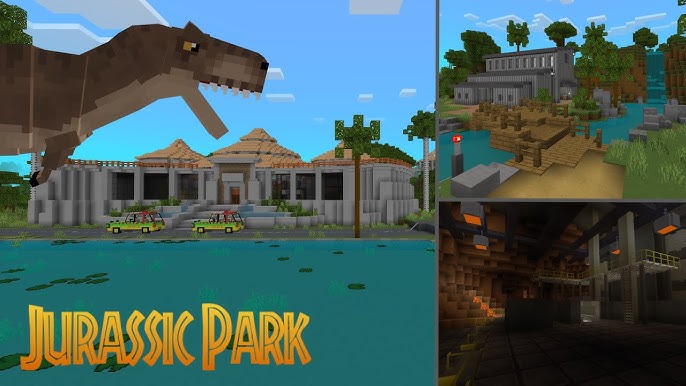
MCPE Minecraft Jurassic Park Experience
Skip to DownloadStep into the ultimate fan-made tribute: the Minecraft Jurassic Park Experience! This immersive map recreates the iconic park with stunning accuracy. Explore the Visitor Center, the Park Gates, and more, all enhanced by a custom texture pack and atmospher
ad
Description
Welcome to the most ambitious and authentic Jurassic Park fan project built in Minecraft. The "Minecraft Jurassic Park Experience" is a love letter to the original film, offering players a chance to wander through the iconic locations of Isla Nublar as they were meant to be seen. This is not just a map; it's a fully realized atmospheric journey designed to evoke the wonder and excitement of the 1993 classic.
From the moment you arrive at the towering main gates to your exploration of the grand Visitor Center with its sweeping staircase and fossil exhibits, every detail has been crafted with painstaking care. The experience is elevated by a seamless custom texture pack that gives blocks a more cinematic and park-accurate feel, and an original audio tour narrated in the style of the park's own guides, created by a dedicated team of fans from the JPLegacy community. While dinosaurs are not included to maintain stability and focus on the architecture, the map is fully compatible with most dinosaur add-ons, allowing you to populate your park with creatures from other wonderful creators. Prepare to be transported back to 1993.
ad
About the Content
The "Minecraft Jurassic Park Experience" stands as a monumental achievement in fan dedication, a project built not for profit but for passion. Its primary goal is immersion, allowing you to become a tourist in John Hammond's doomed park and experience its grandeur firsthand. This map is a detailed, static recreation focused on the architectural and atmospheric elements that made the original film so magical.
Iconic Locations Brought to Life:
The map's core is its faithful recreations of the park's most memorable sets. You can embark on a self-guided tour starting at the Park Entrance, with its iconic logo and towering gates, and follow the winding guided tour road in a Jeep. Key stops along the way include the T-Rex Paddock, complete with the broken fence and the fallen "When Dinosaurs Ruled the Earth" banner, and the Dilophosaurus Paddock, with its distinctive geothermal-themed fencing. The crown jewel is the Visitor Center, a sprawling interior that includes the main lobby with its Brachiosaurus skeleton, the fully modeled Hammond's dining room, the control room with its banks of monitors, and the innovative Raptor pen. Each location is filled with environmental details that tell a story, encouraging exploration and discovery around every corner.
Atmospheric Enhancements:
What truly sets this experience apart is its multi-sensory approach. The included custom texture pack re-skins numerous blocks to resemble the clean, concrete, and metallic surfaces of the real park, moving away from Minecraft's default medieval style. Furthermore, the project features a professionally narrated audio tour. This collaborative fan effort provides commentary as you explore, explaining exhibits and sharing park lore directly in the style of the film, making you feel like you are truly on the official tour. The package is completed with a custom composed musical score that echoes the iconic themes of the franchise. This project is a testament to the enduring legacy of Jurassic Park and is designed for explorers, builders, and fans who wish to relive the movie in an entirely new, interactive way.
Installation
Your Guide to Installing the Experience:
To begin your adventure, you'll need to install two key components: the Map and the Resource Pack. The download link on this page will provide you with both files, typically in a compressed .zip folder.
Step 1: Preparing the Files
After downloading, locate the .zip file on your computer. This time, you will need to extract its contents. Right-click the file and choose "Extract All" to a new folder you can easily find, like your Desktop.
Step 2: Installing the Map
Inside the extracted folder, you will find the map save file (often named something like Minecraft Jurassic Park Experience). You need to place this folder into your Minecraft saves directory. To find this folder, open Minecraft Launcher, go to 'Installations', click on your game version's folder icon, and navigate to the saves folder. Simply drag the map folder into this saves directory.
Step 3: Installing the Resource Pack
Also in the extracted folder, you will find the resource pack file (a .zip file). Open Minecraft, go to 'Options' -> 'Resource Packs' -> 'Open Pack Folder'. Drag the resource pack .zip file directly into this folder. Return to the game, activate the pack, and click 'Done'. The game will reload with the new textures. Now, just load the map from your single-player world list, and your immersive tour of Jurassic Park will begin!
Supported Minecraft Versions
1.21
If the download button doesn't work, click here for alternatives
If you are the original creator and would like this content removed, please submit a request through our DMCA page.