MCPE Effortless Building Enhancements for Minecraft Bedrock
Skip to DownloadEffortless Building for Minecraft Bedrock revolutionizes construction by enabling players to place multiple blocks simultaneously. Choose from various build modes to create walls, floors, and shapes easily while managing your inventory. Perfect for both s
Description
Effortless Building is an innovative addon crafted specifically for Minecraft Bedrock Edition, designed to make the construction process more intuitive and efficient for players. With this addon, players can create structures in a fraction of the time it takes using vanilla mechanics, maximizing creativity and reducing the frustration often associated with building.
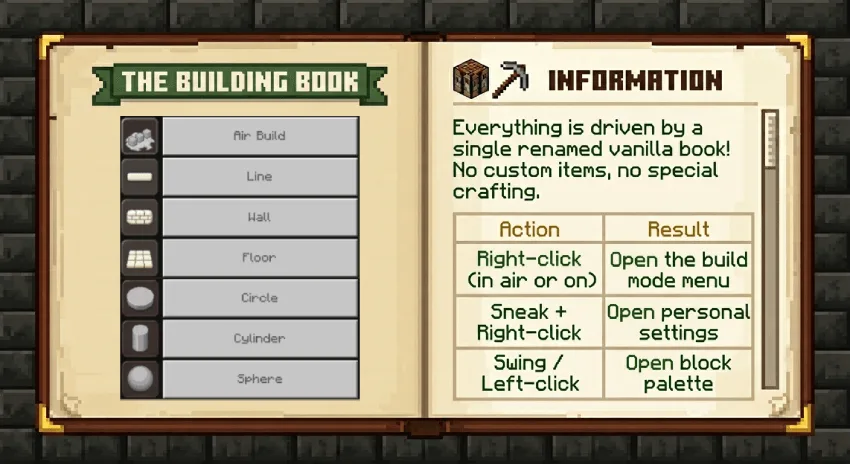
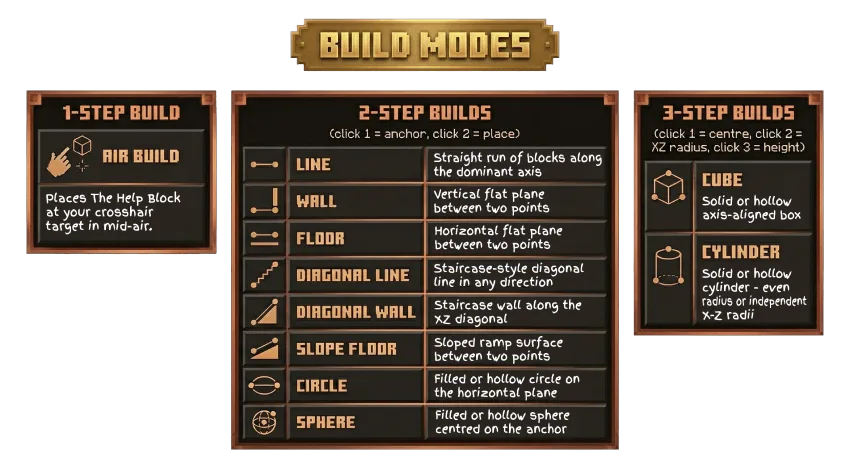
At the core of Effortless Building are its various build modes that allow players to place multiple blocks with just a few clicks. Instead of painstakingly placing each block one-by-one, users can select from modes like Line, Wall, Floor, Cube, Circle, and more. Each mode is tailored for specific building needs, helping players realize their architectural dreams without the hassle. For example, the Line mode allows for quick placement of a straight line of blocks, making it ideal for fences or foundation lines. The Wall mode is perfect for erecting large structures quickly, while the Circle and Cylinder modes help in creating intricate designs effortlessly.
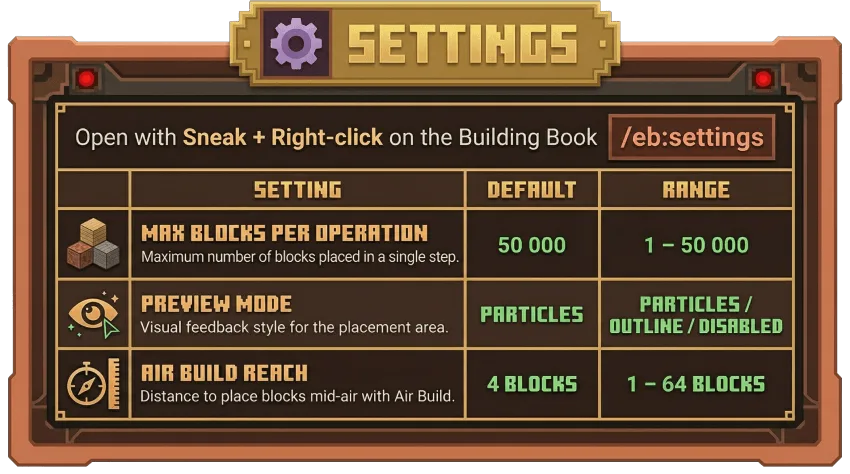
One standout feature of this addon is the live shape preview. As players select their desired build mode, they can see a visual preview of the structure they are about to create. This is displayed through particles and outlines, making it easy to visualize where blocks will be placed before committing to the placement. This feature is particularly useful for ensuring accuracy and preventing misplaced blocks, which can be a common issue in construction.
In addition to the basic functions, Effortless Building provides a unique Air Build mode. This allows players to place blocks in mid-air without needing a supporting surface, which is invaluable when designing complex structures or multi-level builds. This feature can dramatically change how players approach building, giving them the freedom to construct imaginative designs that defy traditional building limitations.
The addon is also survival-friendly, meaning that players need to manage their inventory effectively. Effortless Building automatically checks to ensure that the player has enough blocks before placing them, preventing any inventory mishaps that could occur in the heat of building. This makes the addon suitable for all gameplay styles, whether players are focused on survival mode challenges or creative mode explorations.
For those concerned about making mistakes, Effortless Building includes an undo and redo feature. Players can easily step back up to 20 placement actions, allowing for corrections if a design doesn’t turn out as expected. Additionally, with the ability to customize the block palette, players can build with any blocks they have in their hotbar or choose a specific anchor block, ensuring versatility in their designs.
Furthermore, this addon is designed with multiplayer and server play in mind. Admins have the capability to impose tag restrictions, allowing only certain players to utilize the building features, which is ideal for managing builds in community realms or special events. This level of control helps maintain the integrity of the gameplay environment, ensuring that everyone can enjoy the creative aspects without interference.
In summary, Effortless Building is not just an addon; it’s a game-changer for Minecraft Bedrock Edition players looking to enhance their building experience. Its rich features and user-friendly design make it accessible for both new and veteran players alike, providing tools that cater to all building styles. Whether you’re crafting a cozy cottage or a sprawling castle, this addon will streamline your building process, leaving you more time to explore and enjoy your creations.
About the Content
CHANGELOG:
- Released initial version with multiple build modes.
- Enhanced live shape preview functionality with particle effects.
- Introduced the ability to customize block palette options.
- Fixed several bugs related to block placement in specific environments.
- Improved overall performance and stability for smoother gameplay.
Installation
To install the Effortless Building addon in Minecraft Bedrock Edition, follow these steps:
1. **Download the Addon**: First, obtain the Effortless Building addon file, which usually comes in .mcaddon format.
2. **Open Minecraft**: Launch Minecraft Bedrock Edition on your device (mobile, console, or Windows).
3. **Access Settings**: Navigate to the ‘Settings’ menu from the main screen.
4. **Select Storage**: Within the settings, find and select the ‘Storage’ option.
5. **Import the Addon**: In the ‘Storage’ section, look for the 'Import' option. Select this and navigate to the downloaded addon file. Once selected, the game will automatically import the addon.
6. **Create or Edit a World**: To use the addon, you can either create a new world or edit an existing one. Choose ‘Create New’ or ‘Edit’ on your desired world.
7. **Apply the Addon**: When in the world settings, scroll down to the ‘Behavior Packs’ section. Here, find the Effortless Building addon and apply it as a behavior pack.
8. **Confirm and Play**: After applying the pack, confirm your settings and start your world. You can now enjoy the Effortless Building features!
Remember to check the in-game options to customize your experience according to your preferences.
Supported Minecraft Versions
26.10
If the download button doesn't work, click here for alternatives
If you are the original creator and would like this content removed, please submit a request through our DMCA page.