MCPE Jurassic Terror
Skip to DownloadDinosaurs hunt you! Realistic behavior, nighttime terrors, and a terrifying atmosphere.
Description
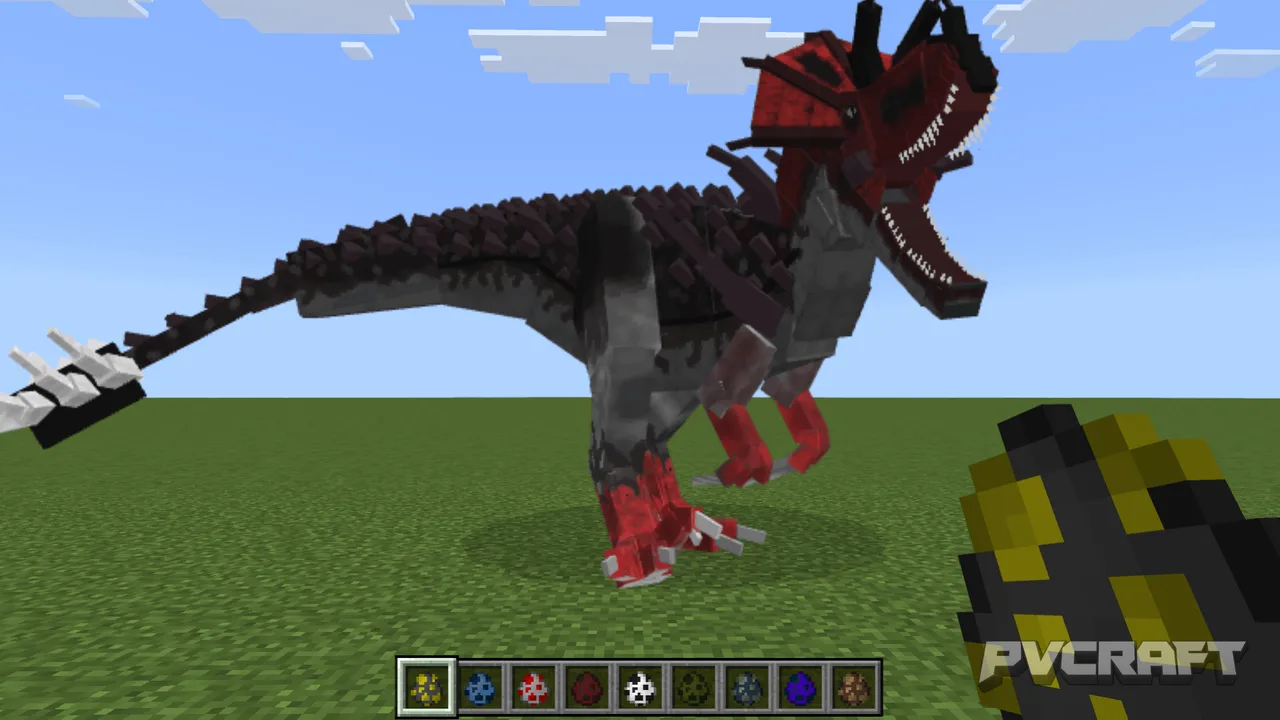
Face your deepest primal fears with the Dinosaur Horror addon for Minecraft Bedrock. This mod completely overhauls your survival experience by introducing dinosaurs as intelligent, terrifying predators rather than simple mobs. These ancient beasts spawn dynamically throughout the world, establishing patrol routes and defending territories. They react to everything: your movement, your sounds, and even your line of sight. Some dinosaurs will observe you from the shadows, waiting for the perfect moment to strike. Others will smash through walls and foliage in a relentless chase once they detect you.
At night, the horror intensifies. Massive carnivores like the Tyrannosaurus Rex roam the darkness, while agile raptors hunt in packs, using ambush tactics to trap you. Every cave entrance, forest clearing, or abandoned ruin becomes a potential ambush point. The unpredictable spawn system ensures no two nights are the same.
The addon also enhances immersion with custom sound effects—terrifying roars, heavy footsteps, and tense musical cues. Dinosaurs feature fluid, eerie animations that make their movements feel alive and menacing. Combined with visual world tweaks, you’ll constantly feel hunted. This is not just an addon; it's a fight for survival where you must use stealth, strategy, and pure courage to live through the nightmare. Can you survive the ancient past?
About the Content
Get ready to face the ancient nightmare from the past with this Dinosaur Horror addon for Minecraft Bedrock. This is not a simple creature pack—it’s a full survival horror transformation where dinosaurs are not just animals, but relentless predators that stalk you from the shadows.
The core feature is Dynamic Dinosaur Behavior. These creatures don't just spawn randomly. They actively patrol their territories, react to your presence, and adapt to your actions. Some will observe you silently from a distance, while others will enter an aggressive hunting mode the moment you get too close. They can break through obstacles, chase you relentlessly, and ambush you when you least expect it.
Nighttime Terrors elevate the horror. When the sun sets, these beasts become even more dangerous. Massive carnivores roam the darkness, while smaller, faster predators wait in ambush near caves, forests, and ruins. The spawn system is designed to feel completely unpredictable, turning every biome into a potential death zone.
The Enhanced Atmosphere ties everything together. With custom roars, eerie footsteps, bone-crunching sounds, and unsettling animations, you'll always feel like something is watching you. Visual tweaks and world effects make the environment feel hostile and alive.
Whether you're exploring a cave, crossing a forest, or hiding in your base, remember: you are no longer at the top of the food chain. This addon delivers a unique blend of prehistoric terror and survival horror, perfect for players who want to feel genuine fear while playing Minecraft Bedrock.
Installation
Download the Addon – Get the two files (usually .mcaddon or .mcpack). One is for the Behavior Pack, the other for the Resource Pack. Sometimes they are combined into one .mcaddon file.
Open the File – Tap on the downloaded .mcaddon or .mcpack file. Minecraft Bedrock will automatically launch and attempt to import the packs.
Check Import Success – After import, go to Minecraft's main menu → Settings → Storage → Resource Packs and Behavior Packs. You should see the Dinosaur Horror mod listed there.
Create a New World – Go to Play → Create New World.
Apply the Packs – Scroll down to the Resource Packs and Behavior Packs sections. Click on each one and activate the Dinosaur Horror mod from the available list. Make sure both are enabled.
Enable Experimental Features – In world settings, scroll down to Experiments and toggle on:
Holiday Creator Features
Beta APIs (if required by the addon)
Complete Setup – Name your world, adjust other settings as you like, then click Create.
Play – Once the world loads, the dinosaurs will begin spawning. Good luck. You'll need it.
Supported Minecraft Versions
1.21
If the download button doesn't work, click here for alternatives
If you are the original creator and would like this content removed, please submit a request through our DMCA page.