MCPE Jurassic Vehicles | Addon
Skip to DownloadDrive the iconic vehicles of Jurassic Park! This addon adds 10 detailed, drivable vehicles from the films, complete with custom paint jobs and functional refueling mechanics. Bring the movie magic to your Minecraft world!
Description
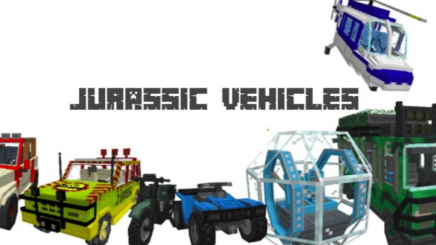
Rev up your engines and journey through Isla Nublar in style with the Jurassic Vehicles Addon! This highly detailed expansion introduces 10 iconic vehicles straight from the Jurassic Park and Jurassic World film series, all fully drivable and packed with interactive features. From the classic Jurassic Park tour Jeeps to the rugged utility vehicles used by the ACU, each model is meticulously crafted to be instantly recognizable.
But this addon goes beyond simple transportation. A new painting system allows you to customize your vehicle's color scheme, while the functional refueling mechanic adds a layer of survival realism. You'll need to keep your vehicles gassed up as you explore, evading dinosaurs and recreating your favorite movie scenes. This update transforms your Minecraft world into an authentic Jurassic vehicle experience.
About the Content
The Jurassic Vehicles Addon is a passion-driven project that focuses on bringing the iconic automotive stars of the Jurassic franchise into Minecraft with unprecedented detail and interactivity. This latest update elevates the mod from a simple vehicle pack to a comprehensive simulation, emphasizing player interaction and customization.
The Fleet: 10 Iconic Movie Vehicles
The addon features a curated roster of the most memorable vehicles from across the film series. Each vehicle is not just a reskinned minecart; it possesses a unique model, handling characteristics, and specific attributes that reflect its on-screen counterpart.
The Jurassic Park Tour Jeep (1993): The most iconic vehicle, featuring the classic red, green, and yellow paint schemes. It's a reliable all-terrain vehicle perfect for safari tours.
The Mercedes-Benz G63 (Jurassic World): The sleek, modern 6x6 used by the park's staff. It's fast and durable, ideal for quick response.
ACU Transport Vehicle: The heavy-duty vehicle used by the Asset Containment Unit. It's slower but offers better protection.
InGen Helicopter: The iconic yellow helicopter used for transport and aerial surveillance over the island.
Motorcycle (Jurassic World): Used by Owen Grady, this vehicle offers high speed and agility, perfect for navigating tight spaces and outrunning smaller predators.
The roster is rounded out with other essential vehicles like the veterinary truck, the utility tractor, and the massive mobile veterinary unit, ensuring there's a vehicle for every scenario.
Advanced Interaction Systems:
What truly sets this addon apart are its deep interactive mechanics, which add layers of strategy and immersion.
Custom Painting System: Using a new "Paint Can" item, players can change the color of most vehicles. This allows for personalization and the recreation of specific vehicles from key movie scenes.
Functional Refueling Mechanic: Vehicles now have a fuel gauge and will eventually run out of gas. Players must craft or find "Fuel Canisters" to refill their tanks. This introduces resource management, encouraging players to establish fuel depots and plan their expeditions carefully rather than driving indefinitely.
Realistic Vehicle Handling: Each vehicle has a unique feel. The Jeep handles differently from the motorcycle, and the helicopter requires takeoff and landing skill. This diversity makes mastering each vehicle a rewarding experience.
This combination of a faithful vehicle roster and engaging gameplay mechanics makes the Jurassic Vehicles Addon an essential download for any fan looking to build, manage, and explore their own authentic Jurassic Park.
Installation
Step 1: Acquire the Addon File
Click the download link on this page to obtain the Jurassic_Vehicles.mcaddon file from our secure host.
Step 2: Integrate with Minecraft
Locate the downloaded file on your device. The most efficient method is to open the .mcaddon file with Minecraft. Double-click it (or tap on mobile) and select Minecraft from the application list. The game will launch and automatically handle the import process.
Step 3: Activate the Vehicle Pack
The addon is now in your library. To spawn the vehicles in a specific world, you must activate it. Go to the world's settings, navigate to 'Behavior Packs', find "Jurassic Vehicles," and click 'Activate'. It is critical that you then go to the 'Resource Packs' menu and activate the "Jurassic Vehicles" resource pack as well. This two-step process is required for the vehicles to appear with their correct models and custom textures.
Step 4: Start Your Engine
Load into your world. The new vehicles can be found in the creative inventory. In survival mode, you will need to craft them using the new recipes. Remember to also craft Fuel Canisters and Paint Cans to utilize the full functionality of your new fleet. Explore in style!
Supported Minecraft Versions
1.21
If the download button doesn't work, click here for alternatives
If you are the original creator and would like this content removed, please submit a request through our DMCA page.