MCPE JURASSIC FENCES 1.8 CRIMSON SPINOSAURUS
Skip to DownloadElevate your Jurassic-themed builds with these immersive fences that fit perfectly in your dino-filled world.
Description
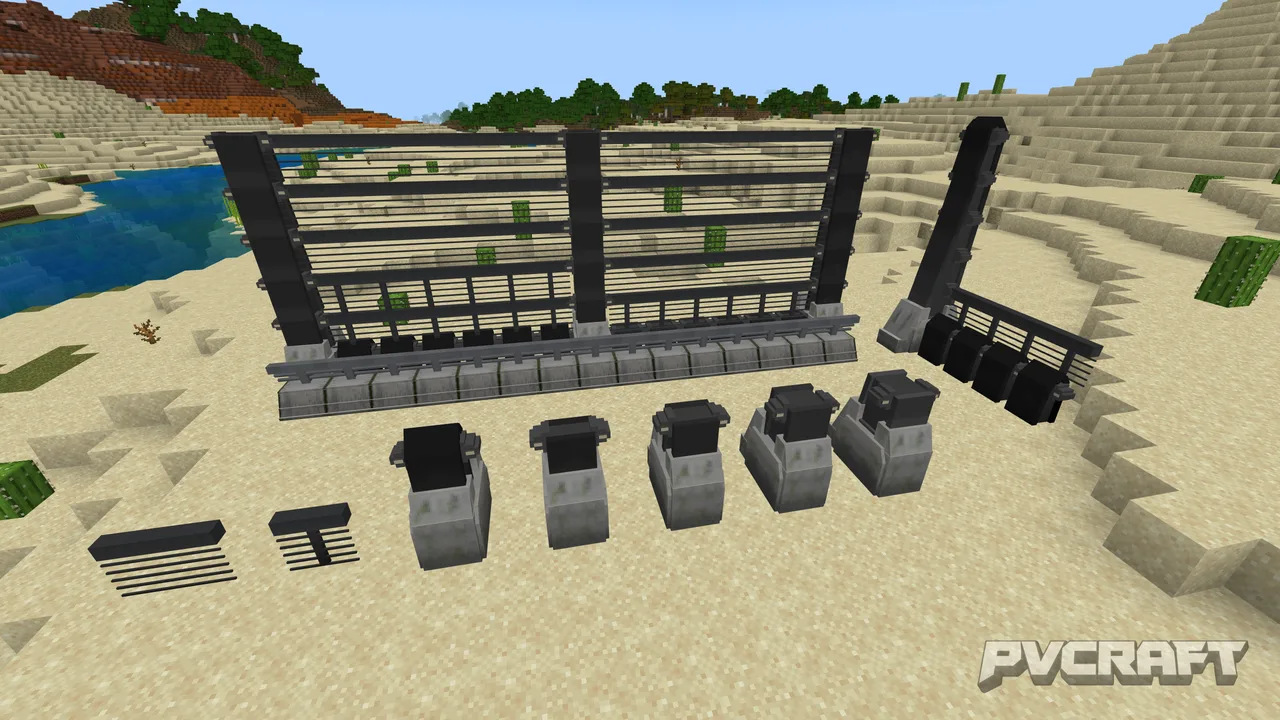
The Jurassic Fences addon is specifically created for Minecraft Bedrock Edition players who have a keen interest in dinosaurs and prehistoric landscapes. This addon adds an intriguing selection of fence types designed to resemble those you might find in a dinosaur park or sanctuary. With three distinctive fence materials available—wood, stone, and reinforced—players can select options that best fit their builds.
In the Jurassic Fences addon, the wooden fences are designed to simulate a rustic, natural look, perfect for a safari-themed world. The stone fences provide a robust, strong aesthetic, ensuring that even the most ferocious dinosaurs can’t escape. Lastly, the reinforced fences are the most durable, ideal for containing high-threat species. Each type not only boasts unique visuals but also different durability, giving players choices based on their construction needs and resources available.
Crafting the fences is straightforward, utilizing standard crafting mechanics familiar to Bedrock players. The recipes have been designed to make sure they’re intuitive and accessible, ensuring that players don’t need to scour resources or inventions for elusive crafting materials. For example, creating wooden fences requires only standard wooden planks, whereas the reinforced option may require players to gather iron or other sturdier materials, making resource management a fun challenge.
Since these fences are part of the Bedrock Edition, they conform to the gameplay mechanics specific to this version, which includes seamless integration into existing gameplay systems. However, it's notable that while decorative, these fences also serve practical purposes. They function like standard fences within the game, preventing mobs or players from passing through when properly placed.
The Jurassic Fences addon also includes optimization for performance, ensuring that player builds remain smooth and lag-free even with a massive number of decorative fences. This is particularly beneficial in areas with many active entities, as players often face performance issues with complex designs—especially crucial in Bedrock, where performance can be sensitive to such intricacies.
Moreover, another essential aspect of the addon is that all fences can be dyed using regular dye items within Minecraft, allowing for further customization. Players can easily create vibrant enclosures in their desired color schemes, which adds a personal touch to every build. This level of customization makes the Jurassic Fences not just a functional addition but also a creative tool, allowing dedicated builders to express their individuality in-game.
The fences blend seamlessly with other decorative elements available in Bedrock Edition, making them a perfect addition for themed parks, zoos, or even private sanctuaries. As players build out their dinosaur worlds, they will appreciate the balance between aesthetic appeal and functionality these fences provide. This addon is a must-have for any Minecraft player who loves dinosaurs or simply wants to elevate their construction game with a unique twist.
The Jurassic Fences addon is perfect for players who enjoy creating custom environments, be it for survival gameplay with a dinosaur theme or purely for aesthetic builds in creative mode. Whether constructing a full-scale Jurassic Park or simply adding details to a themed area, this addon significantly enhances the player's ability to create a livelier, more accurate Jurassic setting. The simplicity of integration coupled with robust features makes this addon ideally suited for any Minecraft Bedrock player seeking to elevate their gameplay experience.
About the Content
The Jurassic Fences addon enhances your Minecraft Bedrock Edition experience by introducing a variety of dinosaur-themed fencing options. This addon is designed for players who want to create realistic enclosures for their prehistoric creations, enhancing both aesthetics and functionality in the game. Players can now build enclosures that are not only visually appealing but also serve to keep their dinosaurs secure.
CHANGELOG:
- Initial release.
- Added three types of dinosaur fences: wooden, stone, and reinforced.
- Improved crafting recipes for easier access.
- Adjusted fence height for better visibility.
- Fixed collision issues with other blocks.
Installation
To install the Jurassic Fences addon for Minecraft Bedrock Edition, follow these straightforward steps:
1. **Download the Addon**: Locate the Jurassic Fences addon file from a reliable source and download it. Ensure the file format is compatible, typically a .mcpack or .mcaddon file.
2. **Open Minecraft**: Launch your Minecraft Bedrock Edition game after the download is complete.
3. **Import the Addon**: If the file is in .mcpack format, double-click it. This action should automatically open Minecraft and add the addon to your game. If it doesn’t, go to the settings within Minecraft, look for the ‘Storage’ option, and select ‘Import’ to manually add the file.
4. **Create or Edit a World**: Go to the 'Worlds' tab and either create a new world or edit an existing one. While editing or creating your world, scroll down to the 'Behavior Packs' and 'Resource Packs' sections. Select 'My Packs' and find 'Jurassic Fences', then click 'Add' to apply both packs.
5. **Adjust Settings**: Before starting the game, ensure all options are correct and set your game mode (creative or survival) as desired.
6. **Load Your World**: Once everything is set, return to the world settings and select 'Play' to load the world with the Jurassic Fences addon enabled.
7. **Crafting the Fences**: In-game, gather necessary materials based on your chosen fence type. Use the crafting table to create the fences as per the recipes defined by the addon.
By following these steps, you'll be set to create captivating enclosures and enrich your Minecraft landscapes with the immersive Jurassic Fences.
Supported Minecraft Versions
1.21
If the download button doesn't work, click here for alternatives
If you are the original creator and would like this content removed, please submit a request through our DMCA page.