MCPE JW EXPANSION ADDON
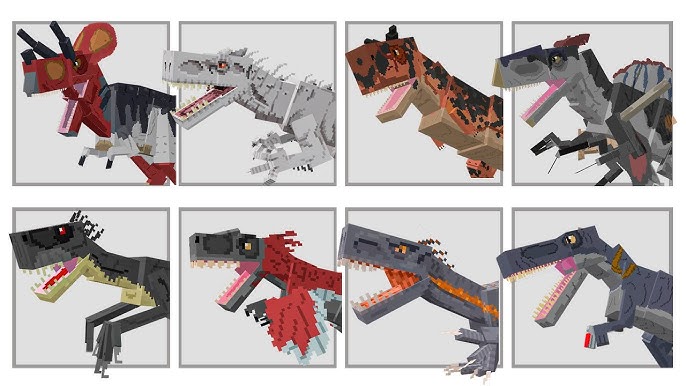
Skip to DownloadJW Expansion is your ultimate portal to the Jurassic era in Minecraft PE! Dive into a world with 60+ dinosaur species, from gentle giants to voracious predators. Build habitats, lead expeditions, and survive in a land where prehistoric titans rule.
Description
Transform your Minecraft Pocket Edition into a living, breathing prehistoric sanctuary with the JW Expansion addon. This isn't just a simple mob addition; it's a comprehensive ecosystem overhaul that places over 60 meticulously designed dinosaur species right into your world. Prepare for a gameplay experience where every journey is a potential expedition and every biome holds echoes of a lost world.
Your role in this new environment is multifaceted. You can become a park manager, constructing secure and suitable habitats for these magnificent creatures. Or, test your survival instincts against the most voracious predators the Mesozoic has to offer. Whether you're a builder, an adventurer, or a paleontology enthusiast, JW Expansion offers an unparalleled sandbox where the boundaries between Minecraft and the Jurassic franchise beautifully blur.
About the Content
JW Expansion stands as a monumental addition to Minecraft PE, designed to deliver the most authentic and expansive Jurassic-themed experience available. It's built upon three core pillars: Diversity, Adventure, and Creation, all supported by a massive roster of over 60 dinosaurs, marine reptiles, and pterosaurs directly inspired by the iconic films.
A Living, Breathing Bestiary:
The addon features a carefully curated list of creatures that ensures a dynamic and balanced ecosystem. You'll encounter towering sauropods like the Brachiosaurus, whose long neck brushes the treetops, and the heavily armored Ankylosaurus. The skies are patrolled by majestic Pteranodons, while the deep oceans hide ancient leviathans like the Mosasaurus. The roster of predators is equally impressive, featuring the king itself, the Tyrannosaurus Rex; the intelligent and pack-hunting Velociraptors; and the formidable Spinosaurus. Each creature is not just a visual replica but possesses unique AI behaviors—herding, hunting, territorial disputes, and specific habitat preferences—that make the world feel truly alive and unpredictable.
Gameplay Reinvented: From Survival to Sanctuary
JW Expansion introduces new gameplay loops that go beyond standard survival:
Paleontology Expeditions: The thrill of discovery is central. You may need to seek out dinosaur nests for eggs or uncover fossil sites to obtain rare resources, turning exploration into a focused and rewarding mission.
Habitat Creation & Management: This addon encourages thoughtful construction. You'll need to design enclosures that consider the size and temperament of their inhabitants. A Triceratops herd needs open space, while a Dilophosaurus requires a more forested environment. This turns creative mode into a park simulation and survival mode into a constant challenge of resource management and security.
Thrilling Survival Challenges: With over 60 species, including apex predators, the world becomes a dangerous place. Navigating a jungle becomes a tense exercise in stealth, and defending your base from a curious carnivore is a heart-pounding event. JW Expansion doesn't just add creatures; it adds a constant, engaging layer of risk and reward.
Installation
Your Gateway to the Jurassic World:
Integrating JW Expansion into your Minecraft PE is a straightforward process. Let's get you from download to discovery in just a few moments.
Step 1: Secure the Addon File
Initiate the process by tapping the download link on this page. Your device will retrieve the complete addon package, named JW_Expansion.mcaddon.
Step 2: One-Tap Integration
Once the download is complete, simply locate the file in your device's storage and tap on it. A menu will appear, asking you how you'd like to open the file. Select Minecraft from the list. The game will automatically launch and begin the import process, handling all the technical details in the background. You'll see a confirmation when it's done.
Step 3: Power Up Your World
The addon is now on your device. The next step is to activate it for your chosen world. Enter Minecraft, go to the world settings, and find the 'Behavior Packs' section. Locate "JW Expansion" and press 'Activate'. This is crucial: You must also visit the 'Resource Packs' menu and activate the "JW Expansion" pack there. This dual activation ensures all dinosaurs appear with their full detail and proper behaviors.
Step 4: Begin Your Expedition
Load into your world. After a brief moment, the new prehistoric inhabitants will begin to generate. We recommend starting a new world or exploring new chunks to experience the full diversity of JW Expansion. Your adventure awaits!
Supported Minecraft Versions
1.21 1.20
If the download button doesn't work, click here for alternatives
If you are the original creator and would like this content removed, please submit a request through our DMCA page.