MCPE Magnificent Minimap
Skip to DownloadEnhance your Minecraft Bedrock experience with the Magnificent Minimap, an addon that provides a dynamic mini-map feature, making navigation in-game a breeze.
Description
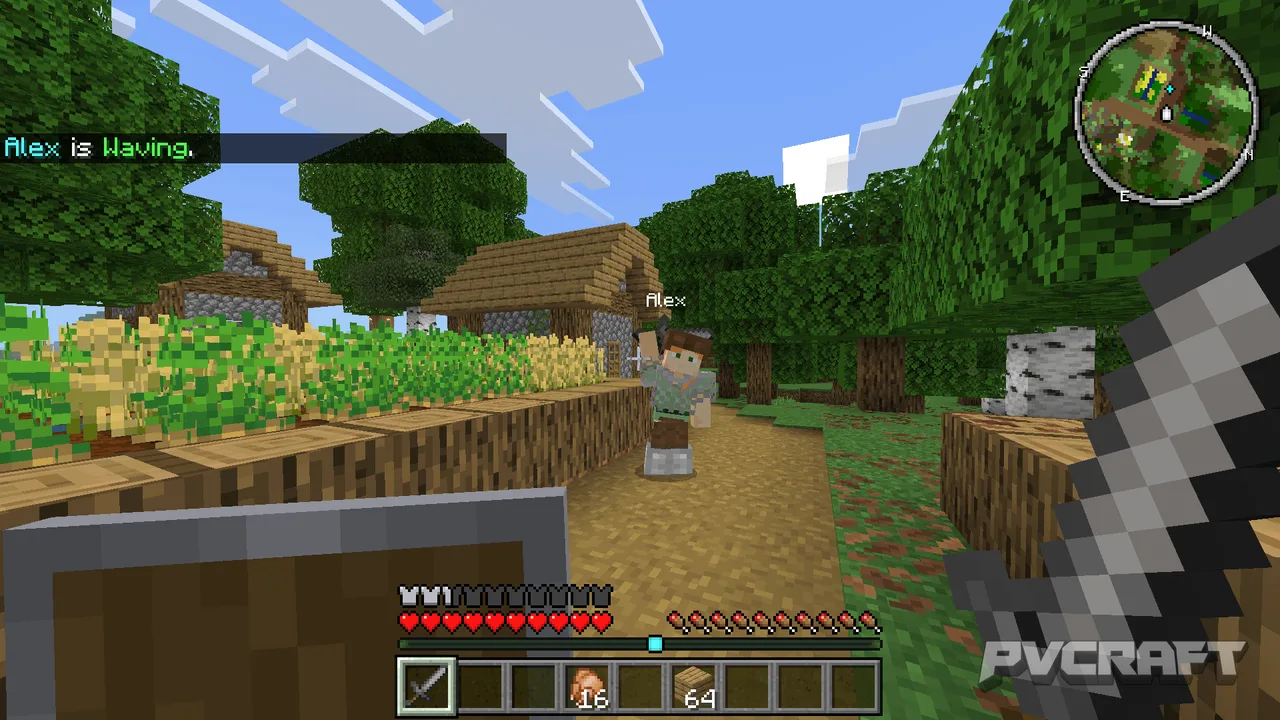
Navigating the vast landscapes of Minecraft can sometimes be a daunting task, especially when you're deep in a forest or far away from your last base. The Magnificent Minimap addresses this issue by providing a mini-map on your screen, which shows not only your current location but also the surrounding terrain, resources, and mobs. This allows you to maintain a sense of direction without having to pause the game frequently or rely on external tools.
Upon installation, players will notice the minimap appears in the corner of the screen, showing a real-time view of the area around them. The map updates dynamically as you move, ensuring that you're always oriented no matter how many biomes you traverse. It also features a zoom function, letting players fine-tune their view for more detailed navigation.
One of the standout features of the Magnificent Minimap is its waypoint system. This allows players to drop markers at important locations, like their home base, villages they've discovered, or even resource hotspots. You can customize the color and shape of these waypoints, making it easy to differentiate between various points of interest. This is especially useful in multiplayer scenarios where coordination is key, as players can quickly share locations with friends.
In Bedrock Edition, interactions with the minimap are simple. Players can use touch controls on mobile, buttons on consoles, or keyboard shortcuts on Windows to manipulate the map. The control scheme makes it accessible, ensuring you can easily switch between viewing the minimap and engaging in gameplay without feeling interrupted or overwhelmed.
Performance-wise, the addon has been optimized for Bedrock Edition to ensure minimal impact on game speed. This way, players can enjoy the benefits of the mini-map feature without experiencing lag or stuttering. The aesthetic design has also been tailored for Bedrock, aligning perfectly with the visual style of Minecraft. The colors and layout are designed to be pleasing while also being functional, providing clear visuals in both daylight and nighttime settings.
The Magnificent Minimap is perfect for all players, whether you're an adventurous survivalist, an efficient builder, or a strategic gamer who thrives on planning and exploration. It enhances the overall gameplay experience by reducing the frustration often associated with getting lost or trying to remember pathways. Tools like this transform how players interact with the world, making exploration feel more structured and enjoyable.
Installation is straightforward. With clear steps to guide you through the process, even those who are new to addons will find it relatively easy. Typically, players will need to download the file associated with the addon and follow specific instructions to add it to their Minecraft game. Once installed, players can access the minimap right from the game settings, where they can further customize its features for their best gaming experience. Just a few taps or clicks, and you’ll be ready to navigate with ease!
About the Content
The Magnificent Minimap is a powerful addon tailored specifically for Minecraft Bedrock Edition. This tool introduces a mini-map to your gameplay, allowing players to easily navigate their environments, mark important locations, and find their way back after exploring. With its clean interface and user-friendly features, this minimap is ideal for both solo players and those who enjoy multiplayer adventures.
CHANGELOG:
- Initial release with basic minimap functionality.
- Introduced waypoint system for marking important locations.
- Enhanced map rendering for better visibility.
- Fixed issues related to map update frequency.
- Added toggle feature for minimap display in-game settings.
- Improved user interface for waypoint management.
- Optimized performance for smoother gameplay experience.
- Adjusted color themes for better contrast in different environments.
Installation
To install the Magnificent Minimap addon for Minecraft Bedrock Edition, follow these simple steps:
1. **Download the Addon:** Begin by downloading the addon file from a trusted source.
- Ensure it is compatible with Bedrock Edition to avoid issues during installation.
2. **Locate the Downloaded File:** Find the addon file in your device's downloads folder. This file will usually be in .mcpack format.
3. **Import the Addon:** Open Minecraft Bedrock Edition. You can do this by double-tapping the app icon.
- The game should automatically recognize the .mcpack file and begin the import process. If it doesn’t, you can manually import it from within the game.
4. **Activate the Addon:**
- Go to the ‘Settings’ menu in the game.
- Navigate to the ‘Storage’ section, then select the ‘Behavior Packs’ and ‘Resource Packs’ options.
- Find the Magnificent Minimap and activate it.
5. **Create or Edit a World:**
- Either create a new world or edit an existing one.
- In the world settings, go to the ‘Behavior Packs’ tab and apply the addon to your selected world.
6. **Start Playing:** Once you have activated the addon and created or edited a world, launch the game and enjoy the enhanced navigation experience!
Additional tips for troubleshooting include:
- If the minimap doesn’t display correctly, double-check that you have activated both the resource and behavior packs.
- Ensure your Minecraft game is updated to the latest version, as older versions may have compatibility issues with new addons.
- If issues persist, consult community forums or guides for more in-depth troubleshooting steps.
Supported Minecraft Versions
1.21.130
If the download button doesn't work, click here for alternatives
If you are the original creator and would like this content removed, please submit a request through our DMCA page.