MCPE ESBE 2G Shader - Outdated
Skip to DownloadThe ESBE 2G Shader enhances lighting and color in the Minecraft Bedrock Edition, providing a more immersive visual experience for players.
ad
Description
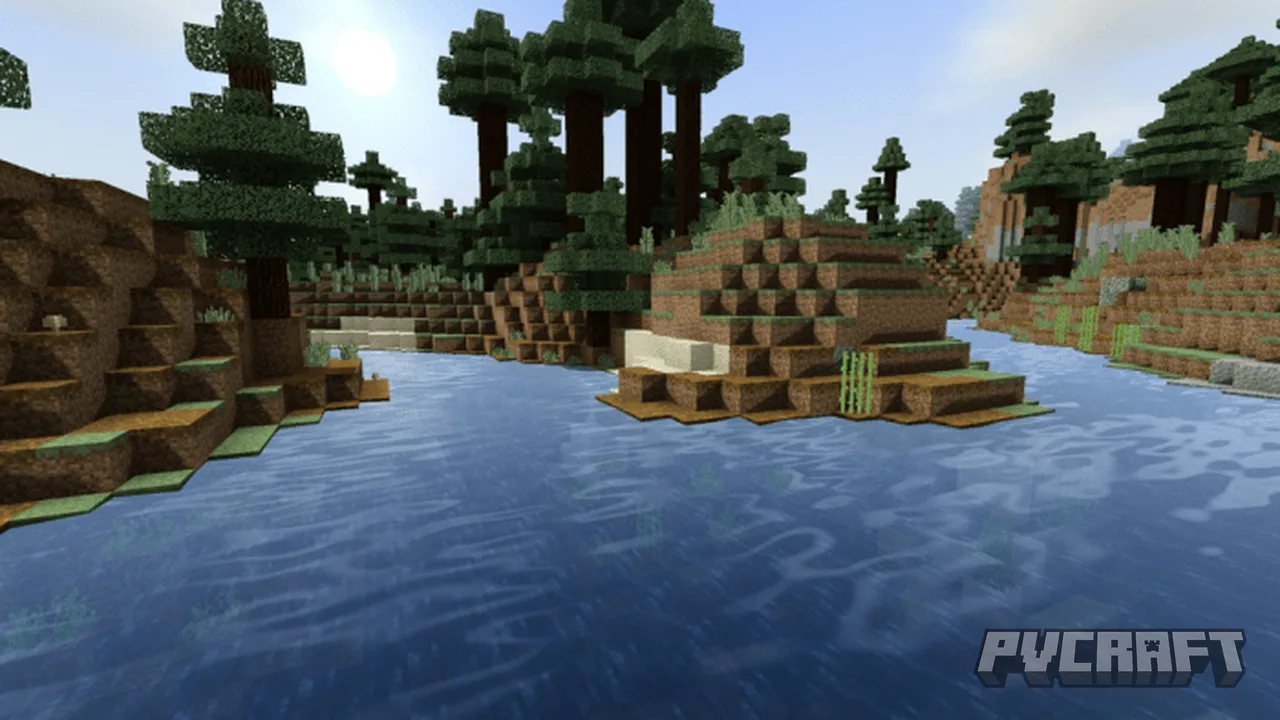
The ESBE 2G Shader is a well-crafted shader for Minecraft Bedrock Edition, intended to upgrade the graphical fidelity of the game. It implements various visual improvements that can dramatically change the appearance of your blocky world. The shader focuses on vibrant colors, realistic shadows, and dynamic lighting, creating an immersive experience unlike the default textures.
One of the standout features of the ESBE 2G Shader is its improved lighting system. Players will notice that sunlight casts dynamic shadows that shift as the day progresses. This means that as the sun rises and sets, the lighting will change to reflect the time of day, making landscapes feel more alive. The shader also enhances artificial light sources; torches, lanterns, and glowstone now emit light more effectively, adding a cozy atmosphere to caves and houses.
In addition to lighting, ESBE 2G modifies the appearance of water in the game. Instead of the flat textures typically seen in Minecraft, water becomes reflective and interacts with the environment, meaning players can see a reflection of nearby structures, trees, or players. This effect not only makes water look more lifelike but also adds an extra layer of depth to builds near rivers, lakes, or seas.
Moreover, the colors in the game are significantly revised with ESBE 2G. Grass appears greener, skies look bluer, and the overall palette feels richer. This enhancement makes exploring Minecraft's diverse biomes even more enjoyable, as the vivid visuals highlight the uniqueness of each environment.
Despite these enhancements, it’s crucial to note that ESBE 2G Shader is optimized for performance. It aims to maintain a reasonable frame rate even on devices that may not be top-of-the-line. This balance allows players to enjoy the visual upgrades without experiencing lag or a drop in performance. Players with lower-end devices can still take advantage of the shader, though they may need to tweak settings for optimal performance.
Installation is a straightforward process for players who are familiar with adding addons or shaders to Minecraft Bedrock. You typically download the shader file and import it into your game settings. The shader can be enabled from the settings menu under the global resources section, making it user-friendly and accessible. Furthermore, it supports various resolutions, so players can choose a version that best fits their device capabilities, ensuring that everyone can benefit from a more enriching visual experience.
For users curious about how their gameplay may change, consider this: building with vibrant shaders can accentuate details in your architectural designs and landscape biology. You might find that blending biomes or creating themed builds looks significantly more stunning with the elevated visual quality that ESBE 2G Shader provides. Whether you're wandering through a lush forest or navigating a bustling city build, the enhanced visuals can draw you deeper into your Minecraft journeys, enriching both single-player and multiplayer experiences.
ad
About the Content
ESBE 2G Shader is a popular shader pack designed for Minecraft Bedrock Edition. It focuses on improving the game's visual aspects while maintaining performance. The shader aims to add realistic lighting, reflections, and enhanced textures to give players a more vivid and engaging gameplay experience.
CHANGELOG:
- Initial release with basic lighting effects.
- Improved color correction for more vibrant visuals.
- Enhanced water textures to reflect surroundings accurately.
- Added support for various graphics settings.
- Adjusted performance optimizations for smoother gameplay in lower-end devices.
This shader is designed specifically for players who want to elevate their Minecraft gaming experience without sacrificing performance. It caters to both casual players who enjoy visually stunning environments and serious builders looking to showcase their creations in the best light possible.
Installation
To install the ESBE 2G Shader in Minecraft Bedrock Edition, follow these steps:
1. **Download the Shader**: Find the ESBE 2G Shader package and download it onto your device. Make sure to save it in a location where you can easily access it.
2. **Open Minecraft Bedrock Edition**: Launch the game on your preferred device.
3. **Go to Settings**: From the main menu, click on ‘Settings’ to access the game’s configuration options.
4. **Access Storage**: Navigate to the ‘Storage’ section within the settings menu.
5. **Import the Shader**: In the storage area, look for the ‘Global Resources’ tab. Here, you will see an option to ‘Import’ or ‘Add’ a resource pack. Click on it and locate the downloaded ESBE 2G Shader file from your device.
6. **Activate the Shader**: Once imported, find the shader in the list of available resource packs. Click on it to activate. Make sure it’s at the top of the list to ensure it overrides other packs that may impact your visuals.
7. **Adjust Graphics Settings**: After activation, return to the main settings menu. Here, you can adjust your graphics settings to optimize performance, especially if you are using lower-end hardware.
8. **Join a World**: Once all settings are adjusted, simply start a new game or join an existing world to experience the enhanced visuals provided by ESBE 2G Shader.
Remember that any changes to resource packs may require a restart of the game for changes to take full effect. Also, consider checking for community updates or modifications for the shader for improved experience and compatibility with future game updates.
Supported Minecraft Versions
1.16.1
If the download button doesn't work, click here for alternatives
If you are the original creator and would like this content removed, please submit a request through our DMCA page.