MCPE Faithful 64x: Bedrock
Skip to DownloadFaithful 64x is a vibrant texture pack for Minecraft Bedrock Edition that enhances your game with high-quality visuals while retaining its classic feel.
ad
Description
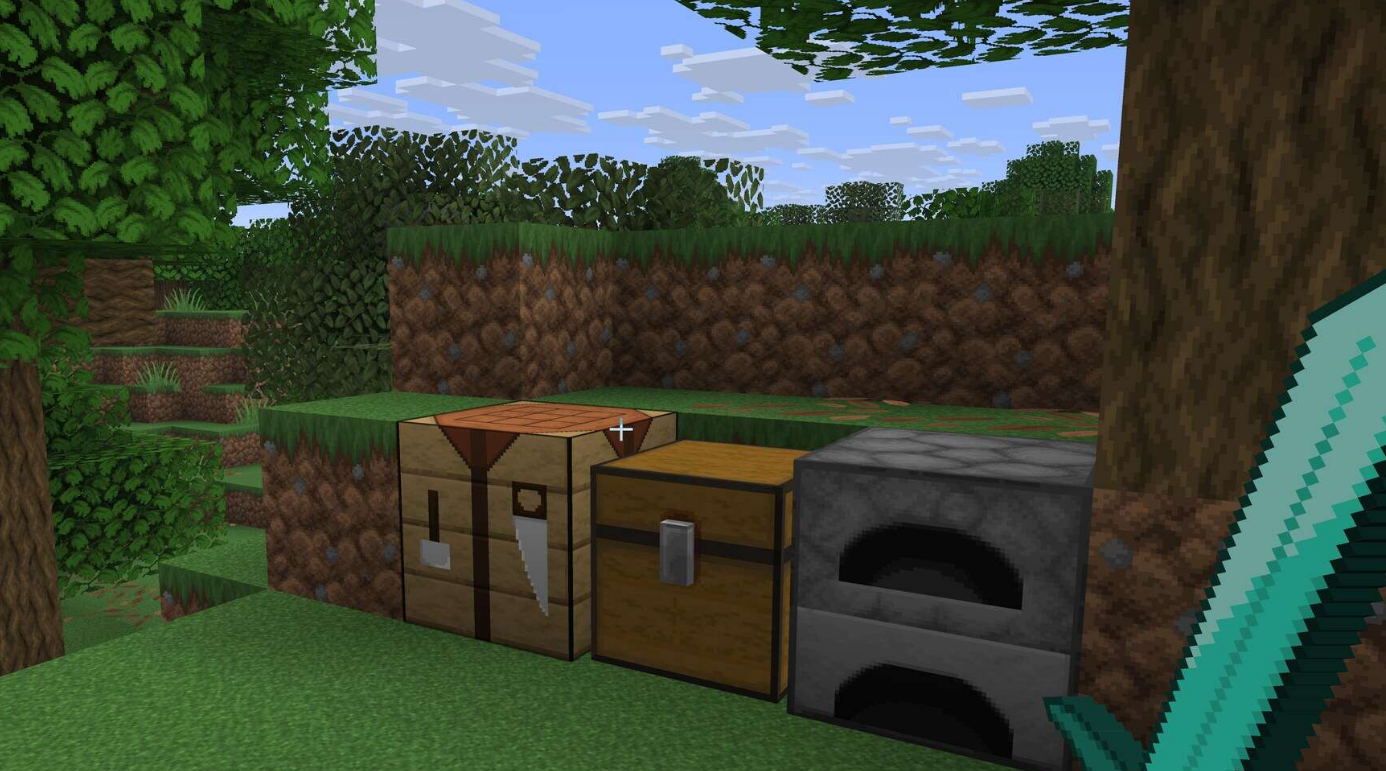
When diving into the Faithful 64x texture pack for Bedrock Edition, players will notice immediate changes in their Minecraft experience. With the textures being four times more detailed than the default versions, the world around you comes alive in a way that is both vibrant and pleasing to the eye. Trees appear lush with individually detailed leaves, while stone blocks have a more realistic appearance that enhances building and exploration. Each texture has been crafted carefully, ensuring that players can enjoy high-definition visuals without interrupting the gameplay or losing the recognizable charm of Minecraft.
One of the standout features of this texture pack is its compatibility with the Bedrock Edition's rendering engine. Unlike some other resource packs that may disrupt performance or cause lag, Faithful 64x has been optimized specifically for Bedrock gameplay. Players can experience the enhanced textures without sacrificing frame rates, making it an ideal choice for both low-end devices and high-performance rigs alike. This means that even on mobile devices or older consoles, you can enjoy a beautifully rendered world without stuttering or choppiness.
Moreover, the Faithful 64x pack does a fantastic job of enhancing the overall user interface. The health and hunger bars are clearer, and item icons have improved detail, ensuring that everything you interact with feels fresh and modern. This attention to detail extends to the crafting interface as well, turning mundane tasks into visually engaging experiences.
However, while Faithful 64x provides many benefits, it’s essential to note that it may not be compatible with every specific Bedrock feature or interactive element. For instance, certain blocks added in recent updates may not yet have a higher resolution equivalent in this pack. Players should check for updates regularly to ensure they're getting the best experience possible as Minecraft continues to evolve.
Installing Faithful 64x is straightforward and offers an effortless way to elevate your Minecraft experience:
1. **Download the Texture Pack:** Find a reliable source and download the Faithful 64x pack directly to your device. Ensure the file format is compatible with Bedrock Edition (usually a .mcpack or .zip file).
2. **Access Your Minecraft Settings:** Open Minecraft Bedrock Edition, go to the main menu, and navigate to ‘Settings’. From there, go to ‘Storage’ and find the downloaded texture pack.
3. **Import the Pack:** If you downloaded a .zip file, you'll need to unzip it first. Once unzipped, navigate to the folder and find the .mcpack file. Simply tapping on it should prompt Minecraft to open and automatically start importing the pack.
4. **Activate the Pack:** After importing, return to the ‘Settings’ menu, and go to ‘Global Resources’ under ‘Settings’. Here you will see the Faithful 64x pack listed. Tap on it and move it to the top of the ‘My Packs’ section to make it active.
5. **Enjoy Your Enhanced World:** Start a new game or load an existing world, and you should instantly see the improved textures. Enjoy exploring Minecraft in a whole new light!
By following these steps, players can seamlessly integrate the Faithful 64x texture pack into their Minecraft Bedrock Edition experience and enjoy the benefits of enhanced visuals and performance.
ad
About the Content
Faithful 64x is a texture pack aimed at enhancing the visual experience in Minecraft Bedrock Edition. It takes the original textures of the game and improves their resolution from the default 16x16 to 64x64, resulting in sharper images and more detailed designs. This texture pack exists to provide players with a visually appealing yet familiar experience, perfect for those seeking a refined Minecraft aesthetic without losing the essence of the game.
CHANGELOG:
- Initial release featuring improved textures
- Updated GUI elements for a cleaner look
- Fixed resolution issues with specific blocks
- Performance optimization for smoother gameplay
- Added compatibility for newer Bedrock updates
Faithful 64x is designed for players who appreciate a mix of nostalgia and enhancement in their gameplay. Whether you're a builder, explorer, or simply enjoy the visual aspect of Minecraft, this pack can provide a fresh perspective on the game. Notably, the textures are designed to be coherent with one another, preventing the visual chaos sometimes seen in other packs. Each block, item, and UI element maintains the spirit of the original game while offering a more polished finish, making it a favorite among many players.
Installation
To install the Faithful 64x texture pack on Minecraft Bedrock Edition, follow these simple steps:
1. **Download the Texture Pack:** Start by downloading the Faithful 64x texture pack file from your chosen source. Ensure that the file type is .mcpack for easy installation.
2. **Locate the Downloaded File:** Depending on your device (mobile, console, or Windows), check your Downloads folder or the specific location where files are saved.
3. **Open the File:** Once you find the .mcpack file, tap or double-click on it. This action should automatically open Minecraft Bedrock Edition, initiating the import process. You will see a notification indicating that the pack is being imported.
4. **Enable the Texture Pack:** After the import is complete, return to the Minecraft main menu. Access ‘Settings’, then navigate to ‘Storage’ or ‘Global Resources’. Here, you'll find the Faithful 64x pack listed among your imported packs. Tap on it, then select ‘Activate’. Ensure it is in the top position of the active packs list to make it apply to your worlds.
5. **Create or Load a World:** You can either load an existing world or create a new one. As you enter, you will notice all the updated textures being rendered in your Minecraft environment.
6. **Adjust in Settings (Optional):** Depending on your preferences, you might want to tweak other graphical settings within Minecraft for optimal performance alongside the Faithful textures. This is particularly helpful if you notice any lag or slowdowns.
7. **Explore and Create:** Dive into your world and enjoy the enhanced visuals that Faithful 64x brings to your gaming experience! Revel in the finely detailed textures as you mine, craft, and explore the vast landscapes of Minecraft.
Supported Minecraft Versions
1.21
If the download button doesn't work, click here for alternatives
If you are the original creator and would like this content removed, please submit a request through our DMCA page.