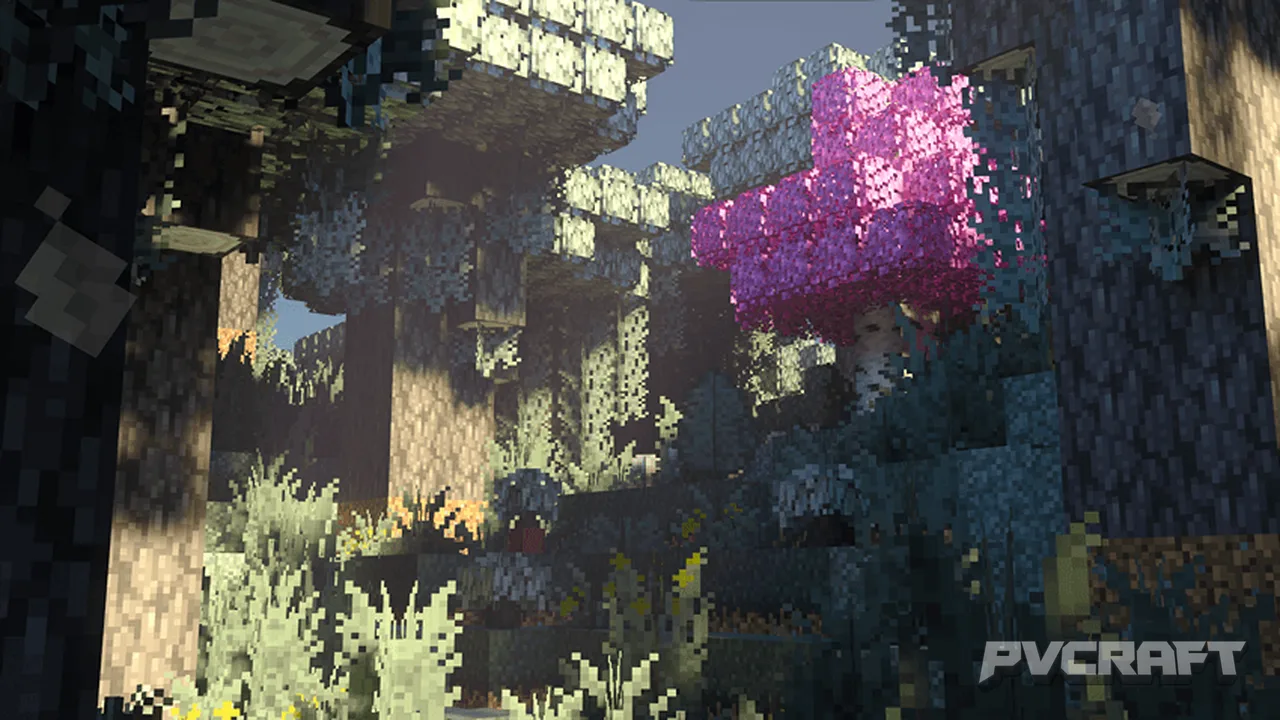
MCPE Overgrown |A Nature Overhaul Texture Pack For Bedrock
Skip to DownloadThe Overgrown texture pack transforms Minecraft Bedrock into a lush, vibrant world packed with greenery and organic aesthetics, enhancing the game's natural ambiance.
ad
Description
The Overgrown texture pack enriches the visual aesthetics of Minecraft Bedrock Edition by enhancing the textures related to the game's natural environment. As players traverse the diverse biomes, they will notice a significant transformation: every shrub, tree, flower, and blade of grass has been meticulously revamped to reflect a more realistic and vibrant portrayal of nature. The pack includes improved textures for every type of vegetation found within Minecraft, from the towering oak trees in forests to the delicate ferns in the jungle.
In jungles, players will notice vibrant green leaves providing a secluded aura, while the flowers are more colorful and detailed, adding to the lush vibrancy of the environment. The texture pack also offers unique elements for each biome, ensuring that each region you explore feels distinct. For example, in swamps, the textures convey a damp, overgrown look, complete with mossy textures, while deserts feature more subdued sands with subtle variations that make them visually intriguing.
Overgrown also enhances player interaction with their environment. For instance, the sounds when walking through grass or bushes feel more pronounced and natural, which greatly contributes to the immersive experience. Moreover, the textures are designed to be compatible with Bedrock Edition's lighting engine, which means that they not only look great in the day but also glow subtly under moonlight, providing a magical touch during nighttime explorations.
Installation of the Overgrown texture pack is straightforward, making it accessible for players of all skill levels. Begin by downloading the texture pack from this page. Once downloaded, follow these steps:
1. Open Minecraft Bedrock Edition on your device.
2. Navigate to the “Settings” menu from the main screen.
3. Select “Storage” and then choose “Import” to add the texture pack to your game.
4. Once imported, return to the main menu, then select “Settings” again.
5. Go to “Global Resources” and find the Overgrown texture pack in the list.
6. Activate the pack by clicking on it and confirming the selection.
7. When creating a new world or editing an existing one, ensure the pack is enabled in your world settings under “Behavior Packs” or “Resource Packs.”
8. Start your game and immerse yourself in the revitalized nature of Minecraft with the Overgrown texture pack.
Whether you're building elaborate structures within natural settings or simply exploring the beautifully crafted landscapes, the Overgrown texture pack provides an extraordinary enhancement to the overall Minecraft experience. Its combination of detailed textures, immersive sound effects, and subtle visual improvements come together to create a nature-filled world, engaging players and making every adventure feel refreshing and unique.
ad
About the Content
The Overgrown texture pack is designed exclusively for Minecraft Bedrock Edition, providing a profound overhaul of the game's default textures to emphasize a richer, nature-centric environment. This pack aims to rejuvenate the in-game landscapes, making forests, jungles, and other biomes significantly more immersive and appealing.
CHANGELOG:
- Initial release with completely revamped textures for all vegetation.
- Improved block textures to enhance the look of logs and leaves.
- Adjusted color palettes for flowers and grass to create a more natural feel.
- Changed textures for stone and dirt to integrate seamlessly with the newer vegetation styles.
- Added custom textures for biome-specific features, such as swamp and desert.
- Enhanced particle effects for flora interactions during gameplay.
The Overgrown texture pack is intended for players who enjoy a natural, vibrant gameplay experience and want their biomes to feel more alive. It’s ideal for adventurers, builders, and those who appreciate the aesthetics of nature within the Minecraft world.
Installation
To install the Overgrown texture pack, follow these step-by-step instructions:
1. **Download the Pack**: Start by downloading the Overgrown texture pack from this page. Ensure that the file is compatible with Minecraft Bedrock Edition.
2. **Open Minecraft**: Launch Minecraft Bedrock Edition on your preferred device, whether mobile, console, or Windows.
3. **Access Settings**: From the main screen, look for the “Settings” option at the bottom right corner and tap on it.
4. **Storage Options**: Once in Settings, navigate to the “Storage” section. Here, you will find an option to “Import” resource packs.
5. **Import the Texture Pack**: Tap on the “Import” button and locate the Overgrown texture pack file you previously downloaded. Select it to upload the pack into your game.
6. **Activate the Pack**: After importing, go back to the Settings menu, select “Global Resources,” and scroll through the list to find the Overgrown texture pack. Tap on it to activate.
7. **Apply to Your World**: When you create a new world or edit an existing one, ensure that the Overgrown texture pack is enabled in the world’s settings under the Resource Packs menu.
8. **Enjoy Your New World**: Start your game to explore the beautifully enhanced landscapes. Notice how the richly detailed textures of vegetation and natural elements change the look and feel of your world.
By following these straightforward steps, you can easily bring the beauty of nature to life in your Minecraft Bedrock Edition experience with the Overgrown texture pack.
Supported Minecraft Versions
1.21.122
If the download button doesn't work, click here for alternatives
If you are the original creator and would like this content removed, please submit a request through our DMCA page.