MCPE Vanilla RTX Normals
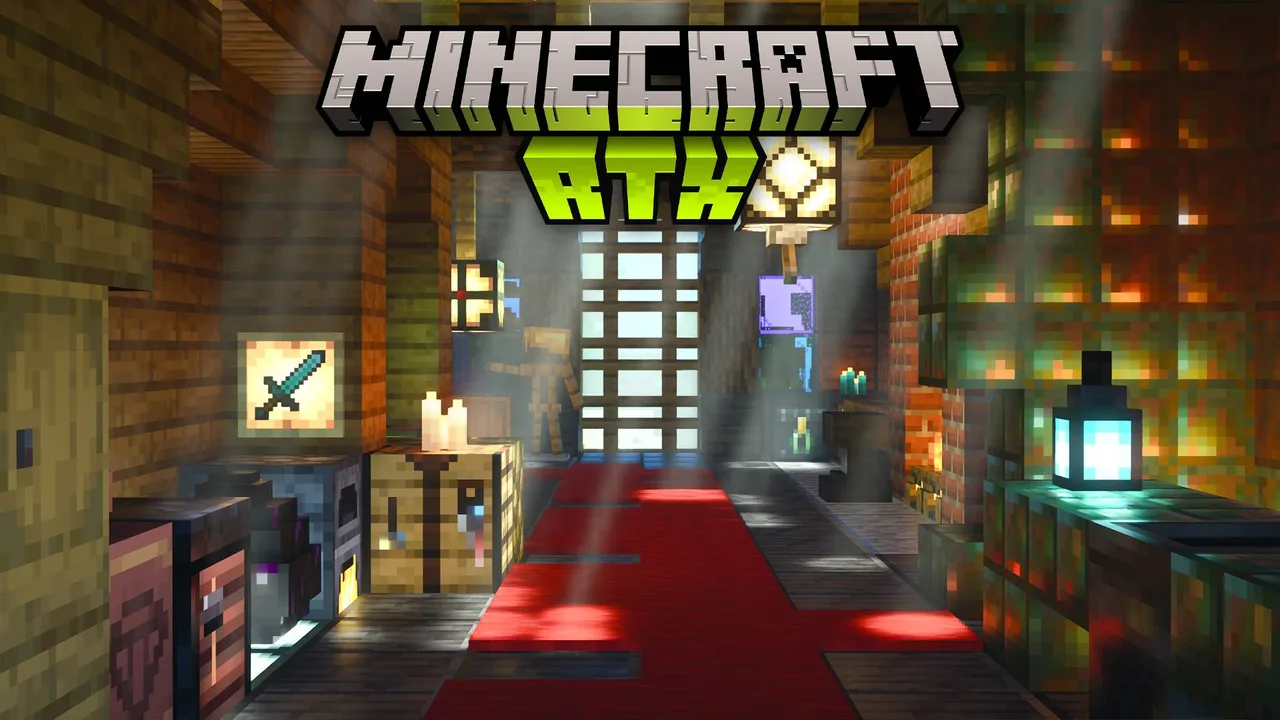
Skip to DownloadVanilla RTX Normals enhances the visual fidelity of Minecraft Bedrock Edition by integrating ray tracing effects with vanilla textures, making the game look more immersive and realistic.
ad
Description
The Vanilla RTX Normals texture pack is designed specifically for players who want to elevate their Minecraft experience on the Bedrock Edition. By utilizing the ray tracing capability available on compatible devices, this texture pack transforms the appearance of default textures into stunning visuals, allowing for advanced lighting effects that were previously unattainable. This enhancement is particularly striking in environments with complex light interactions, such as caves, forests, and during different times of the day.
The pack focuses on leveraging normals maps, which define how light interacts with surfaces. Each surface can now reflect light differently, providing depth and realism. For instance, a cobblestone path will appear much more textured and dynamic, as the subtle changes in height on the surface catch the light in unique ways. This enhances the player’s sense of immersion, making it feel as though they are interacting with a much more sophisticated world.
One of the notable gameplay impacts is the aesthetic transformation during explorations and combat situations. Players traversing dark caves with torches will notice considerably more depth, shadows, and light interplay on the walls and ground. Similarly, during the day, sunlight creates beautiful reflections on water, mimicking real-world physics. This is especially captivating during sunset or sunrise, where colors blend seamlessly across the horizon due to the dynamic lighting effects.
While Vanilla RTX Normals enhances the game aesthetically, it also caters to performance. The texture pack has been optimized for the Bedrock Edition, ensuring that even players on less powerful devices can still enjoy improved visuals without experiencing significant frame rate drops. However, it is worth noting that for the best experience, running the addon on devices equipped with dedicated ray tracing features is recommended, as it fully realizes the potential of the normal maps and lighting.
Beyond just improving the looks, Vanilla RTX Normals also aids in gameplay by allowing players to better judge distances and shapes. When mining, players can more easily perceive the textures of ores, and the way light interacts helps with navigation in darker areas. This arguably makes it a prime addition for both casual players and those who take their building and survival strategies seriously.
To get started with Vanilla RTX Normals on Minecraft Bedrock Edition, it's a simple process of downloading and applying the texture pack within the settings menu. Ensure your device supports ray tracing to experience all enhancements fully. Once applied, players can toggle the texture pack on and off to see the drastic visual differences it creates, allowing for quick adjustments based on preference.
When exploring seed worlds or creating magnificent builds, Vanilla RTX Normals offers a level of visual satisfaction that makes every adventure feel fresh and spectacular. It not only breathes new life into already known landscapes but also enhances the challenge and beauty of building projects, encouraging creativity and elaborate designs that stand out dramatically against the backdrop of realistic lighting.
Whether you are a builder looking to showcase your creations to friends, an explorer wishing to see the depth of Minecraft’s landscapes, or a survival enthusiast aiming to enhance your gameplay, Vanilla RTX Normals is an essential texture pack that transforms the familiar world of Minecraft into something truly remarkable.
ad
About the Content
PART 1 – SHORT DESCRIPTION:
Vanilla RTX Normals is an addon for Minecraft Bedrock Edition that significantly upgrades the game’s visual experience by converting standard textures into enhanced normals that work with ray tracing. This allows players to enjoy stunning lighting effects, reflections, and depth, making the world of Minecraft feel more lifelike. With this addon, players can appreciate their builds and explorations under a completely new lighting dynamic, enriching the overall gaming experience.
PART 2 – CHANGELOG:
- Initial release of Vanilla RTX Normals for Minecraft Bedrock Edition.
- Added support for ray tracing, improving visual realism.
- Enhanced normal maps for selected vanilla textures.
- Improved light reflection effects on water and glass surfaces.
- Fixed compatibility issues with certain resource packs.
- Adjusted contrast and brightness for better visibility under various lighting scenarios.
Installation
Installing Vanilla RTX Normals is a straightforward process, designed to be accessible even for those new to using texture packs in Minecraft Bedrock Edition. Here’s how you can get started:
1. **Download the Texture Pack**: First, locate the Vanilla RTX Normals texture pack available on this page. Download the pack to your device. Ensure you are downloading a version compatible with Minecraft Bedrock Edition.
2. **Import the Texture Pack**: After the download is complete, open Minecraft and go to the main menu. Navigate to ‘Settings’ and select ‘Storage’. Here you can manage your resource packs. Select ‘Import’ or ‘Add’, depending on your version of the game, which allows you to import the new texture pack. Locate the downloaded file to initiate the upload into the game.
3. **Apply the Texture Pack**: Once imported, go back to the main settings menu. Choose ‘Settings’, then scroll down to ‘Global Resources’. Here, you will find various resource packs available for use. Select Vanilla RTX Normals from the list and move it to the ‘Active’ section to enable it.
4. **Check Device Compatibility**: Before entering a world, ensure that your device supports ray tracing. Without ray tracing capabilities, the normal maps may not function as intended, limiting the visual improvements.
5. **Start a New World or Load Existing One**: You can now enter a new world or load an existing one to see the effects of Vanilla RTX Normals in action. Take a moment to appreciate the enhanced textures, light behaviors, and overall aesthetics as you play.
6. **Adjust Performance Settings**: If you notice performance issues, consider adjusting the graphic settings in Minecraft. This can help balance out the visual enhancements with gameplay smoothness.
7. **Switch Back If Needed**: If Vanilla RTX Normals doesn’t suit your preference, you can easily switch back to default textures through the same menu, ensuring that you can tailor your Minecraft experience to your liking.
By following these steps, you can easily install and enjoy Vanilla RTX Normals, immediately immersing yourself in the enriched visuals and gameplay dynamics it offers.
Supported Minecraft Versions
1.21
If the download button doesn't work, click here for alternatives
If you are the original creator and would like this content removed, please submit a request through our DMCA page.