MCPE Holographic Item Labels for Enhanced Gameplay
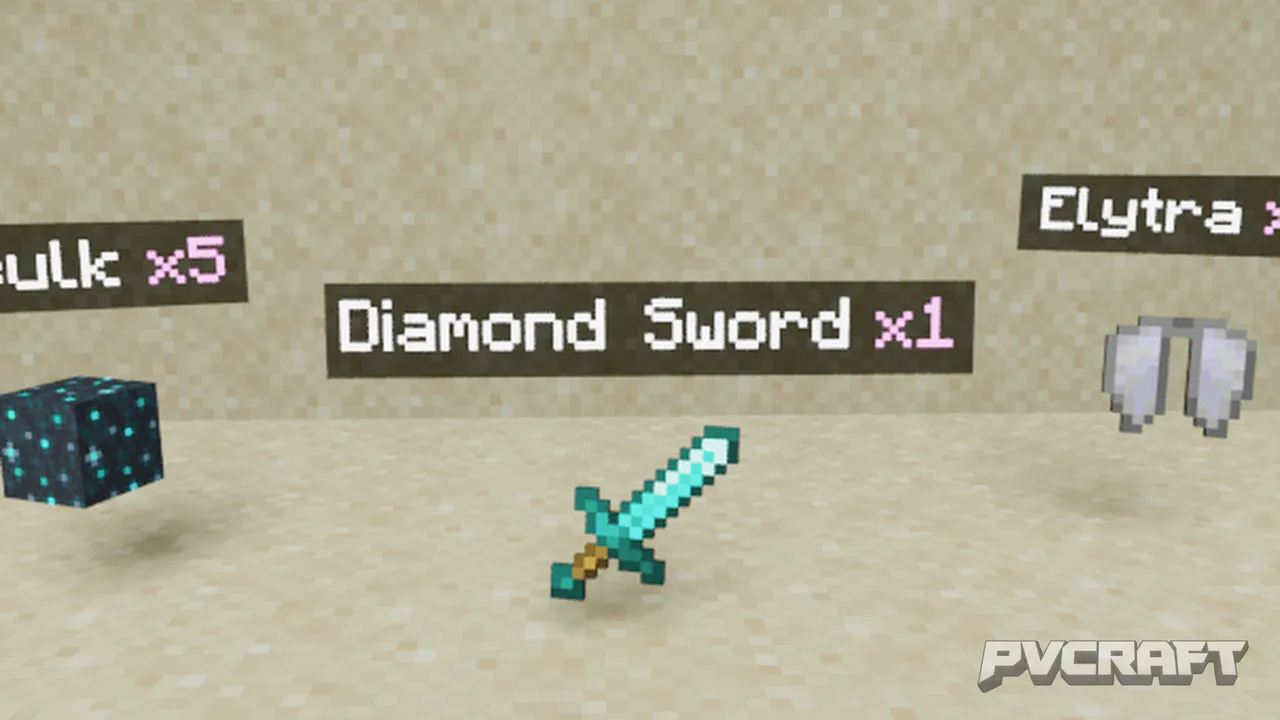
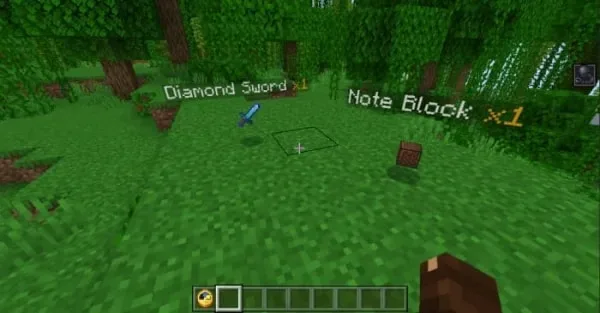
Skip to DownloadExperience a new level of item identification with the Holographic Item Labels addon, which displays the name and quantity of dropped items above them. This enhances visibility and clarity, allowing players to recognize items from a distance without needi
Description
In the expansive world of Minecraft Bedrock Edition, organization and clarity are crucial for both survival and creativity. Enter the Holographic Item Labels addon, a transformative tool designed specifically for players looking to enhance how they interact with the game’s numerous item drops. This addon showcases vibrant holographic labels that appear above each dropped item, providing real-time information regarding the item's name and quantity. This means you can effortlessly identify what you’re picking up, even from significant distances, without needing to focus on the item’s texture.
One of the standout features of this addon is its raycasting capability. With this system, holograms are only displayed on items that are visible to the player. If an item is obscured by terrain or other blocks, the hologram will not appear until the player has a clear line of sight. This feature not only maintains realism but also adds a layer of strategic gameplay, as players must navigate their surroundings to spot item drops effectively.
Moreover, the Holographic Item Labels addon supports two modes of operation that cater to different gameplay styles. The first mode allows holograms to appear on the closest items within a specified radius, while the second focuses solely on items that the player is directly aiming at with their crosshair. This flexibility helps players tailor their experience according to their preferences, whether they are scavenging in a busy area or carefully managing their inventory.
Customization is another highlight of this addon. Players have the ability to modify the appearance of the holograms to suit their tastes. You can alter colors, add prefixes or suffixes, and even create multiline text patterns. With a maximum character limit of 100, the possibilities are nearly endless, allowing for creative expression through the holographic labels. For instance, players can create custom labels for specific drops, such as labeling rare ores or essential resources, making it even easier to gather items during a frantic mining session.
The ease of installation is another aspect that makes this addon appealing. Applying it to a Minecraft world is straightforward; players simply need to enable certain experimental features to ensure compatibility. Once applied, players will notice that the addon operates seamlessly, activating holograms on newly dropped items immediately. However, it is important to note that previously dropped items will not display holograms unless they are dropped again after the addon has been implemented.
In addition to its functional benefits, the Holographic Item Labels addon is designed to operate flawlessly within multiplayer environments. All players in a shared world can see the holograms, making collaboration easier and enhancing gameplay dynamics in multiplayer sessions. This feature encourages teamwork and communication among players, particularly in survival scenarios where resource management is critical.
Overall, the Holographic Item Labels addon brings a fresh perspective to item management in Minecraft Bedrock Edition. It not only enhances visibility and organization but also promotes an interactive and engaging gameplay experience. Whether you are a seasoned player or new to the game, this addon proves to be an invaluable tool for improving item recognition and overall efficiency. Prepare to elevate your Minecraft adventures with this innovative addition that makes every drop count!
About the Content
CHANGELOG:
- Initial release featuring holographic labels for dropped items
- Added customizable hologram text patterns
- Introduced raycasting for enhanced visibility
- Optional multiplayer support for collaborative gameplay
- Improved performance for smoother operation in various environments.
Installation
Installing the Holographic Item Labels addon in Minecraft Bedrock Edition is a simple and user-friendly process. Follow these steps to get started:
1. **Download the Addon**: First, ensure you have the addon files downloaded on your device. This typically includes a behavior pack and a resource pack.
2. **Open Minecraft**: Launch the Minecraft Bedrock Edition game on your device, whether it’s mobile, console, or Windows.
3. **Access Settings**: From the main menu, navigate to ‘Settings’. Here, you will find options related to your game and world settings.
4. **Enable Experiments**: Under the world settings section, look for and enable the experimental features, particularly the "Beta APIs" option. This is crucial for the Holographic Item Labels addon to function correctly.
5. **Create or Select a World**: You can choose an existing world or create a new one. If you are creating a new world, make sure to apply the addon packs during the world setup process.
6. **Apply the Packs**: Go to the ‘Behavior Packs’ and ‘Resource Packs’ sections and add the downloaded packs. Make sure both are activated.
7. **Start the Game**: Once everything is set, enter your world. As you drop items, you should see the holographic labels appear above them immediately.
8. **Adjust Settings (Optional)**: If you wish to customize the appearance and settings of the holograms, you can access the command feature in the chat by typing `/function itemsHolograms_config` to open the settings window.
By following these steps, you'll be ready to enhance your Minecraft gameplay experience with the Holographic Item Labels addon, making item recognition clearer and more fun!
Supported Minecraft Versions
26.20
If the download button doesn't work, click here for alternatives
If you are the original creator and would like this content removed, please submit a request through our DMCA page.