MCPE JW DECORATIONS
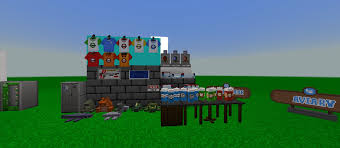
Skip to DownloadUnleash your inner park designer! Created by Zygo (aka Jack), this massive decorations addon delivers over 64 Jurassic Park AND Jurassic World props. Build with 40 decorative blocks and place 24 detailed elements with spawn eggs for the ultimate authentic

Loading video...
Description
Calling all park builders and lore enthusiasts! This is the definitive decoration pack for creating your dream Jurassic installation. I'm Zygo (also known as Jack or Zaigooo), and I've merged the iconic aesthetics of both Jurassic Park and Jurassic World into a single, comprehensive addon. Forget choosing between classic and modern—now you have the entire franchise's visual library at your fingertips.
With a massive collection of 64 unique items, your creative possibilities are endless. The addon is smartly split into two categories for ultimate ease of use: 40 Decoration Blocks for building and structuring, and 24 Spawn Egg items for placing detailed, pre-made props exactly where you want them. Whether you're recreating the rustic charm of the original park or the sleek, modern feel of Jurassic World, this is your all-in-one toolkit.
About the Content
Crafted by Zygo, this Jurassic Decorations addon is a passion project designed to fill a crucial gap for builder communities. It's not about dinosaurs; it's about the world they inhabit. This first version provides an extensive library of over 64 meticulously designed assets that blend the best of both Jurassic eras, allowing for unparalleled storytelling and set-dressing in your Minecraft worlds.
A Builder's Dream: Two Types of Assets
The addon is organized into two intuitive categories to streamline your building process:
40 Decoration Blocks: This is your foundation. These are full blocks you can place and build with, just like any vanilla block. This category includes:
Jurassic Park Era: Classic concrete textures with the iconic "Warning: Electric Fence" signs, rustic wooden barriers, and the distinct patterned walls from the Visitor Center.
Jurassic World Era: Sleek, modern lab equipment, glass control panels with holographic displays, contemporary light fixtures, and the clean, white and gray concrete used throughout the new park.
Universal Elements: Park benches, various types of fencing (from simple railings to heavy-duty industrial gates), and different types of foliage perfect for landscaping your exhibits.
24 Spawn Egg Items: These are for the details that bring a scene to life. Use these spawn eggs to place static props and set pieces. This category includes:
Functional Props: Security cameras, working computers on desks, emergency flare boxes, and functional light posts.
Atmospheric Details: The classic "When Dinosaurs Ruled the Earth" banner, skeletons and fossils for exhibits, jeeps and other vehicles, and various types of scientific equipment like microscopes and DNA sequencers.
Signage: Both the classic JP logo signs and the modern JW logos, as well as directional and warning signs.
This combination allows you to construct the shell of a building with decoration blocks and then meticulously fill it with life and story using the spawn egg props. It’s the ultimate resource for creating screenshots, adventure maps, or simply your own fully-realized Jurassic park.
Installation
How to Get Building with Zygo's Decorations:
Getting this addon into your game is a simple process. Let's get you set up so you can start building right away.
Step 1: Grab the File
Head to the download link on this page and get the .mcaddon file. This single file contains all the decoration blocks and spawn eggs.
Step 2: The One-Click Install
Once it's downloaded, your job is easy. Just find the file and double-click on it (or tap it on mobile). Your device will ask you what app to use—pick Minecraft. The game will open and automatically unpack and install everything for you. It's that simple.
Step 3: Turn On the Props
Now, the addon is on your device, but you need to switch it on for your world. Go into the world you want to build in and open its 'Settings'. Look for the 'Behavior Packs' section. You'll see the decorations pack listed there. Click 'Activate' to turn it on. This is very important: You must also go to the 'Resource Packs' section and activate the pack there, too. If you don't, the blocks will be invisible or look broken.
Step 4: Your Creative Inventory Awaits
Load into your world. Open your creative inventory and search for "Jurassic" or "Zygo". You'll find all 64+ items ready to be placed. The decoration blocks are in the blocks tab, and the spawn eggs are in the misc tab. Now, let your imagination run wild!
Supported Minecraft Versions
1.21 1.20
If the download button doesn't work, click here for alternatives
If you are the original creator and would like this content removed, please submit a request through our DMCA page.