
MCPE Enhanced 3D Armor for Minecraft Bedrock
Skip to DownloadTransform your Minecraft Bedrock experience with Enhanced 3D Armor, featuring intricately modeled armor sets that enhance your character's appearance while retaining the original game's aesthetics.
ad
Description
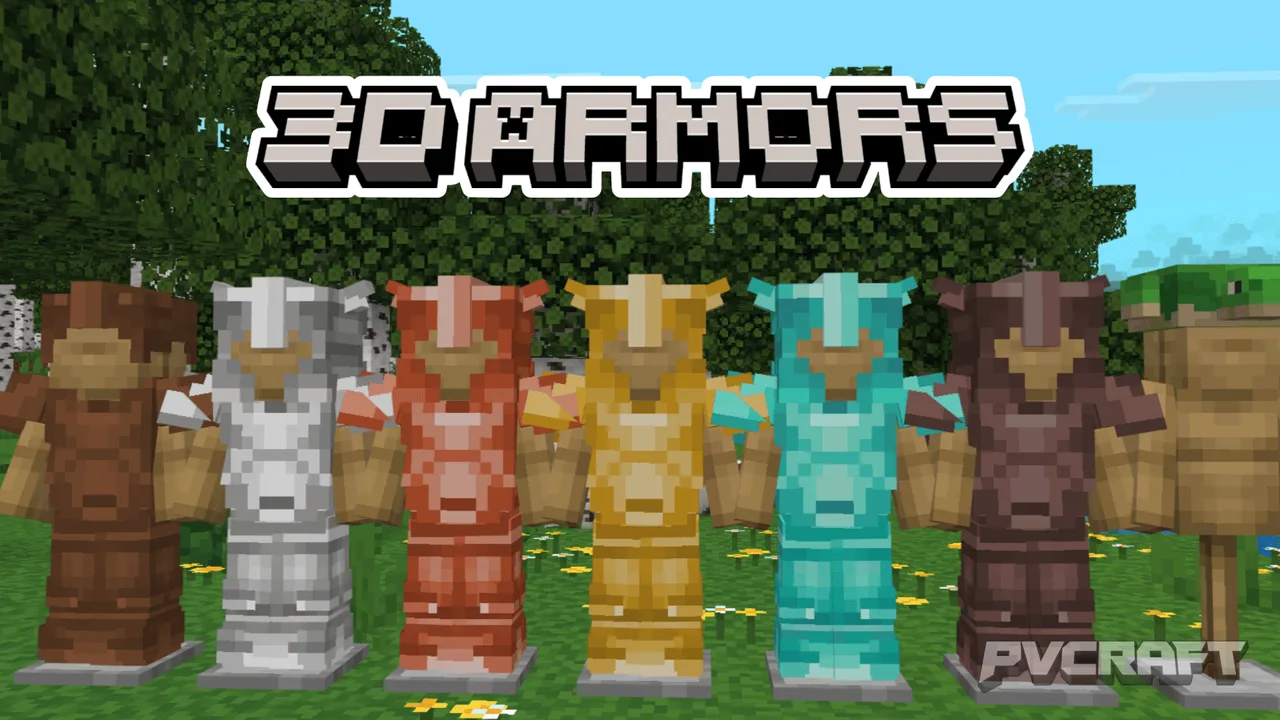
Enhanced 3D Armor is a remarkable texture pack specifically designed for Minecraft Bedrock Edition that revolutionizes the way armor is represented in the game. By replacing the flat, basic armor models with stunning, fully modeled 3D gear, players can immerse themselves in a more visually engaging experience. Each armor tier, from the humble leather set to the formidable Netherite armor, is meticulously crafted to reflect its unique properties and design.
One of the standout features of this texture pack is the complete overhaul of all armor pieces. Players will find that each set includes detailed helmets, chestplates, leggings, and boots, all designed to fit naturally on the player's character model. This attention to detail ensures that armor not only looks impressive but also maintains proper positioning during movement and animations. For instance, the 3D models are designed to fit snugly on the player's avatar, providing a realistic and immersive gameplay experience.
The leather armor set shines with its custom 3D model, which is fully dyeable. This means that players can utilize all 16 available dye colors to personalize their armor, making it truly unique. The texture pack enhances the visual quality of dyed leather, ensuring that the colors are bright and accurate, allowing players to express their individual style in the Minecraft world.
For those who prefer the sturdier armors, the texture pack delivers beautifully detailed iron, gold, and diamond armor sets. Each of these sets features intricate designs and crisp, defined plating that highlight the unique characteristics of the materials. The visual improvements make the game more appealing, especially for players who enjoy showcasing their hard-earned gear.
Moreover, the Netherite armor and the newly introduced Copper armor sets are designed with heavy, realistic 3D models that incorporate material-accurate shading. This elevates the overall appearance, making it distinctively clear which armor tier a player is wearing. The addition of a 3D turtle helmet also provides a fun touch for players who want to add a bit of flair to their character's look.
Another impressive feature of the Enhanced 3D Armor pack is the enchantment glow effect that is applied to all armor sets. When players equip enchanted armor, a glowing aura will surround the armor pieces, making them stand out significantly in gameplay. This effect is particularly useful during combat, as it gives a clear visual cue of which armor has been enchanted, enhancing both aesthetics and functionality during battles with mobs or other players.
In terms of compatibility, Enhanced 3D Armor works seamlessly with Minecraft Bedrock Edition, ensuring that the installation process is straightforward and hassle-free. Players can expect the texture pack to function optimally across all platforms, whether they are playing on mobile, console, or Windows.
This texture pack not only beautifies the armor but also enriches the overall gaming experience by making the player feel more connected to their equipment. Each time players don their armor, they will appreciate the craftsmanship and details that reflect the hard work put into survival and gameplay. Whether you're venturing into the depths of a cave or preparing for a battle against the Ender Dragon, Enhanced 3D Armor will certainly upgrade your visuals and gameplay experience.
ad
About the Content
CHANGELOG:
- Initial release featuring fully modeled 3D armor sets across all tiers.
- Enhanced textures for leather armor, ensuring vibrant and true color representation.
- Added detailed metal armor models for iron, gold, and diamond sets.
- Introduced accurate material shading for Netherite and Copper armors.
- Fixed minor bugs related to armor visibility during animations.
Installation
To install the Enhanced 3D Armor texture pack in Minecraft Bedrock Edition, follow these simple steps:
1. **Download the Texture Pack:** Begin by downloading the texture pack file from a reliable source. The file will usually be in .mcpack format, which is compatible with Minecraft Bedrock.
2. **Open the File:** After the download is complete, locate the .mcpack file in your device's file manager. Simply tapping on the file should automatically open it with Minecraft, prompting the game to begin the import process.
3. **Import the Pack:** Once Minecraft is opened, the texture pack will be imported automatically. You should see a message indicating the successful import of the texture pack. If prompted, confirm that you want to add it to your game.
4. **Activate the Texture Pack:** To use your new texture pack, navigate to the Minecraft main menu. Go to Settings, then select ‘Storage’ and find the ‘Texture Packs’ section. Locate Enhanced 3D Armor in the list and tap on it to activate. If you want to apply it to a specific world, go to the world settings and select the texture pack from the list before entering the game.
5. **Enjoy the Game:** Once activated, launch your world and enjoy the enhanced visuals that the Enhanced 3D Armor pack brings to your game. Observe how your character’s armor looks and feels as you engage in your Minecraft adventures!
Make sure to check back for any updates to the texture pack as new features or improvements may be added over time.
Supported Minecraft Versions
26.30
If the download button doesn't work, click here for alternatives
If you are the original creator and would like this content removed, please submit a request through our DMCA page.