
MCPE Enhanced Hotbar Slot Buttons for Improved Gameplay
Skip to DownloadTransform your gaming experience in Minecraft Bedrock Edition with the Enhanced Hotbar Slot Buttons. These innovative buttons make it easier to navigate your hotbar on screen, improving efficiency during gameplay. Fully customizable and lightweight, they
ad
Description
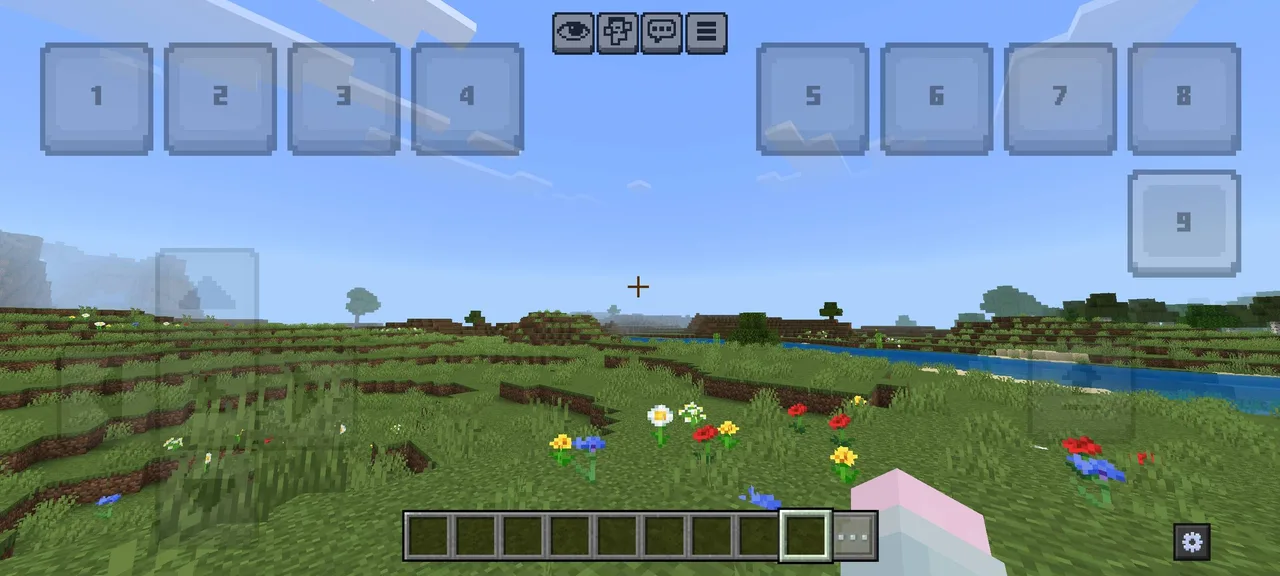
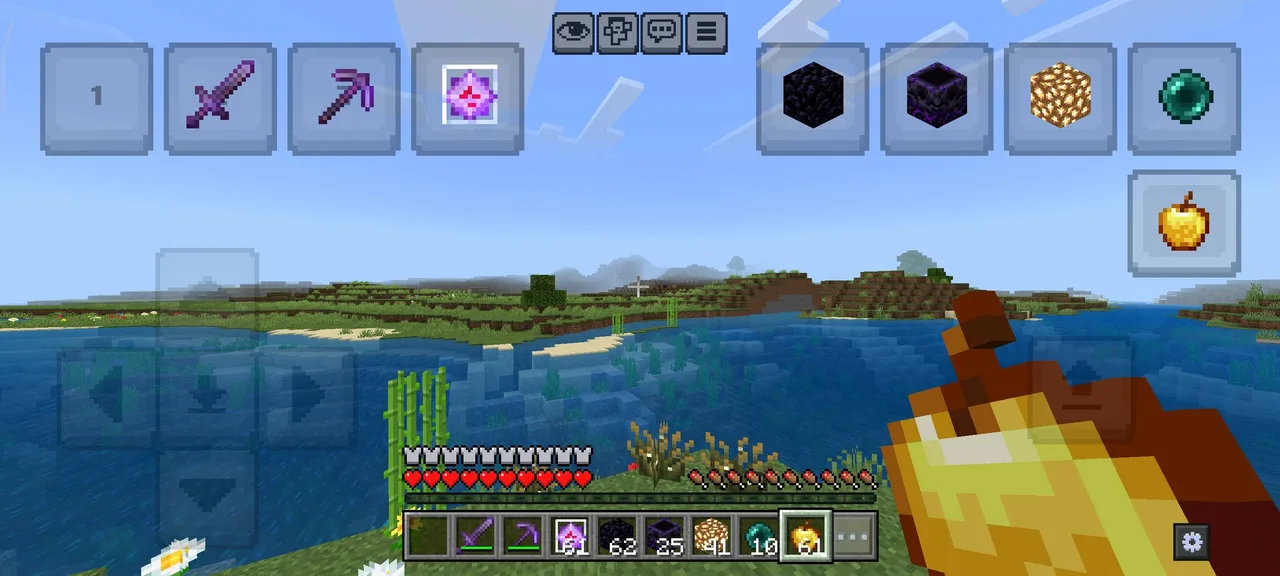
The Enhanced Hotbar Slot Buttons texture pack revolutionizes the way players interact with their hotbar in Minecraft Bedrock Edition. Designed specifically for mobile, console, and Windows users, this pack introduces new buttons that mimic the functionalities of the hotbar, making it significantly easier to manage your inventory while engaging in gameplay.
As players dive into Minecraft, efficient management of tools and items is critical, particularly during intense PvP battles or intricate building sessions. The Enhanced Hotbar Slot Buttons provides a solution to reach your hotbar more easily and switch items with just a tap. Each button corresponds directly to a hotbar slot, allowing players to quickly change items without fumbling around the screen or losing precious time during gameplay.
One of the standout features of this texture pack is its support for a two-finger mode. This is particularly useful for players who may be mining or battling and need to switch tools quickly. For instance, if you're mining with a pickaxe and suddenly encounter gravel, you can quickly switch to a shovel using the button without having to lift your finger away from the screen. This seamless transition increases your efficiency, keeping you engaged in the action without interruption.
Customization is a core aspect of the Enhanced Hotbar Slot Buttons. Players can easily adjust the size and position of the buttons to fit their personal preferences or play style. By accessing the editor panel through the gear icon located at the bottom right of the screen, you can move buttons around and resize them using a slider. This means that whether you prefer larger buttons for ease of access or smaller ones to minimize distraction, you can create a layout that suits your gameplay needs.
However, it’s important to note that due to the limitations of the JSON UI in Minecraft Bedrock, any customizations made in-game will not be saved automatically. To preserve your button configurations, you will need to copy the provided code and replace it in the _global_variables.json file. Although this might seem a bit technical, it's a small trade-off for the significant benefits offered by the enhanced functionality.
The user experience is further improved with vibrant, sleek textures that not only add a modern look to your inventory management but also match the overall aesthetic of Minecraft. The buttons are intuitively designed, ensuring that they are easy to spot and use during chaotic battles or focused building sessions. These enhancements make it easier to keep your items organized and accessible at all times, ultimately enhancing your overall gameplay experience.
In summary, the Enhanced Hotbar Slot Buttons texture pack is a game-changer for Minecraft Bedrock players who seek efficiency and customization in their gaming experience. By providing intuitive access to your hotbar, supporting smooth transitions between tools, and allowing for personalized button arrangements, this pack is essential for any player looking to level up their gameplay. Whether you are a casual builder or a competitive player, the Enhanced Hotbar Slot Buttons will help you stay on top of your game.
ad
About the Content
CHANGELOG:
- Initial release with core features.
- Enhanced compatibility for recent Minecraft Bedrock updates.
- Introduced customizable button sizes and positions for better accessibility.
- Fixed minor UI glitches reported by users.
- Improved responsiveness in two-finger mode for seamless tool swapping.
Installation
To install the Enhanced Hotbar Slot Buttons texture pack in Minecraft Bedrock Edition, follow these steps:
1. **Download the Texture Pack:** First, ensure that you have downloaded the .mcpack file for the Enhanced Hotbar Slot Buttons from a trusted source.
2. **Open Minecraft Bedrock Edition:** Launch your Minecraft Bedrock Edition game on your device (mobile, console, or Windows).
3. **Access Settings:** From the main menu, navigate to the "Settings" menu.
4. **Go to Storage:** Scroll down to find the "Storage" tab. Here, you will see options for managing your resource packs.
5. **Import the Pack:** Click on the "Import" button. This should automatically detect the downloaded .mcpack file and begin the installation process.
6. **Activate the Pack:** Once installed, go back to the settings and select "Global Resources" to find the Enhanced Hotbar Slot Buttons pack. Click on it and select "Activate" to enable the texture pack for your gameplay.
7. **Customize Buttons:** After activating, enter a game and you can access the editor panel to customize the position and size of your new buttons as per your preferences.
8. **Save Your Configuration:** Remember to copy the customization code to save your button layout changes in the _global_variables.json file if you wish to retain your setup!
Once these steps are completed, you are ready to enhance your gameplay with the Enhanced Hotbar Slot Buttons. Enjoy a smoother Minecraft experience!
Supported Minecraft Versions
26.10
If the download button doesn't work, click here for alternatives
If you are the original creator and would like this content removed, please submit a request through our DMCA page.