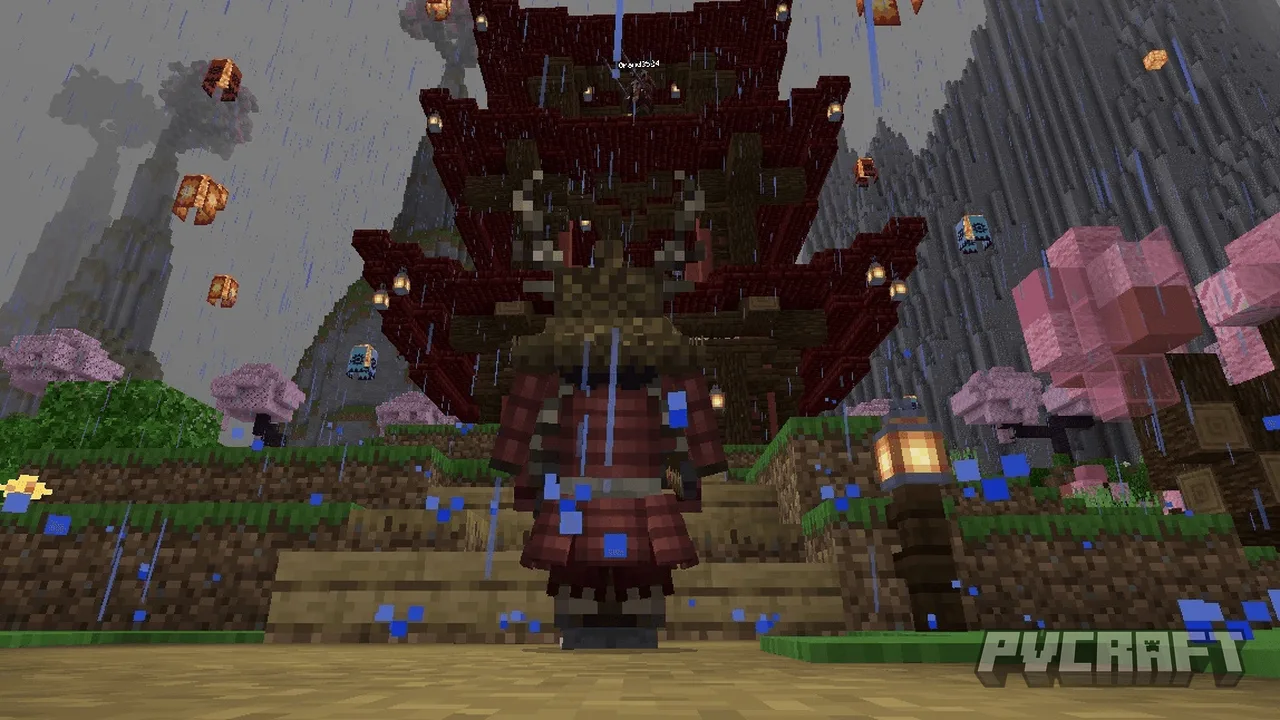
MCPE King Studios SMP (Feudal Japan) Texture
Skip to DownloadExperience the rich aesthetic of Feudal Japan with the King Studios SMP texture pack, specifically designed for Minecraft Bedrock Edition. Transform your gameplay with unique textures that enhance immersion in a samurai-themed world.
ad
Description
The King Studios SMP (Feudal Japan) texture pack transforms the look and feel of Minecraft Bedrock Edition by providing a cohesive set of textures modeled after the stunning and intricate designs of Feudal Japan. Each block, item, and creature has been meticulously crafted to reflect the era's architecture, nature, and cultural elements. Whether you're constructing a serene Zen garden or a formidable castle, the textures work harmoniously to enhance your builds.
Players can expect reimagined textures for common blocks such as stone, wood, and cobblestone, which now showcase intricate patterns reminiscent of traditional Japanese art. For example, the wood blocks feature rich grains that mimic the look of polished timber often used in historical Japanese structures. Stone bricks have been altered to show natural weathering, giving your structures an authentic appearance as if they were ancient constructs standing the test of time.
In addition to block textures, the texture pack revamps inventory items, including swords, bows, and armor sets. The weapons feature designs inspired by traditional samurai gear, with beautiful embellishments that reflect craftsmanship from the era. Armor pieces have unique textures to evoke the look of kimonos and other traditional Japanese garments, allowing for deeper role-play potential in survival or adventure maps.
Creativity is key with this texture pack. It’s encouraging for players to develop building ideas linked to the cultural and architectural elements of Feudal Japan, including temples, pagodas, and even expansive castle complexes surrounded by moats. Environments that include cherry blossom trees and tranquil water bodies provide a picturesque backdrop, enriching gameplay experiences and community server interactions.
Moreover, performance has been optimized for various Bedrock platforms. Whether you're on mobile, console, or Windows, players can enjoy a seamless gaming experience without sacrificing visual fidelity.
To install the King Studios SMP (Feudal Japan) texture pack, follow these steps:
1. Download the texture pack file available on this page. It’s usually a .mcpack or .zip format.
2. If downloaded as a .zip file, unzip it. You may need a file extractor app for this. Make sure you can locate the unzipped file easily.
3. Open Minecraft Bedrock Edition.
4. Navigate to the 'Settings' menu, then select 'Storage'. Here, you will find an option to import textures.
5. Import the .mcpack file by selecting it. If it’s a .zip file, move the textures into the resource pack folder manually.
6. Once uploaded, go to ‘Settings’, then ‘Global Resources’, and you'll see the new texture pack listed under 'Available Packs'.
7. Click on the pack and activate it.
8. Load your world, and enjoy the Feudal Japan aesthetic in all its glory!
Be sure to adjust in-game settings based on your device capabilities for the best experience. The King Studios SMP texture pack brings a unique flair and cultural richness to Minecraft Bedrock Edition, inviting you to explore and build a captivating world inspired by the traditions of Japan.
ad
About the Content
The King Studios SMP (Feudal Japan) texture pack is an extensive modification that enriches your Minecraft Bedrock Edition experience by introducing a visually stunning Japanese theme. This texture pack is tailored for players who appreciate the aesthetics of Feudal Japan, complete with exquisite designs and vibrant colors.
CHANGELOG:
- Initial release with a comprehensive texture overhaul for all blocks and items.
- Included new textures for weapons and armor to match the Feudal Japan theme.
- Improved item interfaces to enhance user experience.
- Adjusted color palettes for a more immersive environment.
- Fixed minor bugs affecting visual performance on various devices.
- Enhanced compatibility with latest Bedrock updates.
This texture pack is meant for players who want to immerse themselves in a richly themed environment while exploring through their Minecraft world, whether in survival or creative mode. It's excellent for servers focused on role-playing, creating unique builds, or simply enjoying a new atmosphere in the game.
Installation
To install the King Studios SMP (Feudal Japan) texture pack for Minecraft Bedrock Edition, follow these detailed steps to ensure a smooth experience:
1. **Download the Texture Pack**: Click on the link to download the texture pack file. It typically comes in a .mcpack format, which is directly compatible with Bedrock Edition.
2. **Check Your Device**: Make sure your device is compatible with Minecraft Bedrock Edition. The pack is optimized for mobile, console (like Xbox), and Windows platforms.
3. **Import the Texture Pack**:
- If you downloaded a .mcpack file, simply double-click it; Minecraft should automatically open, and the pack will be imported directly.
- For .zip files, extract the contents using your preferred extractor tool. Make sure you're familiar with locating files on your device.
4. **Open Minecraft Bedrock Edition**: Once the pack is imported, launch your game.
5. **Access Settings**: From the main menu, navigate to `Settings`. Scroll down and click on `Storage`. You should see the texture pack listed under the 'Resource Packs' section.
6. **Activate the Texture Pack**: Navigate back to the `Settings` menu, and select `Global Resources`. Here, you can view both active and available resource packs. Locate the King Studios SMP (Feudal Japan) texture pack in the 'Available Packs'. Click on it, and then click on ‘Activate’.
7. **Load or Create a World**: Now that the texture pack is activated, either load an existing world or create a new one. The textures will automatically apply, transforming your gameplay environment to reflect the beautiful designs of Feudal Japan.
8. **Enjoy the Experience**: Dive into your newly enhanced world. Notice how everyday blocks and items have a unique aesthetic inspired by traditional Japanese artwork and culture, enriching your Minecraft experience.
If you encounter any issues, ensure your game is updated to the latest version, and recheck if you followed each step accurately. Happy crafting and building!
Supported Minecraft Versions
1.21
If the download button doesn't work, click here for alternatives
If you are the original creator and would like this content removed, please submit a request through our DMCA page.