MCPE Overture 16x Texture Pack for Minecraft Bedrock
Skip to DownloadTransform your Minecraft Bedrock experience with the Overture 16x texture pack. Featuring improved visuals, vibrant colors, and refined user interface elements, this pack enhances your gameplay while maintaining clarity and performance.
ad
Description
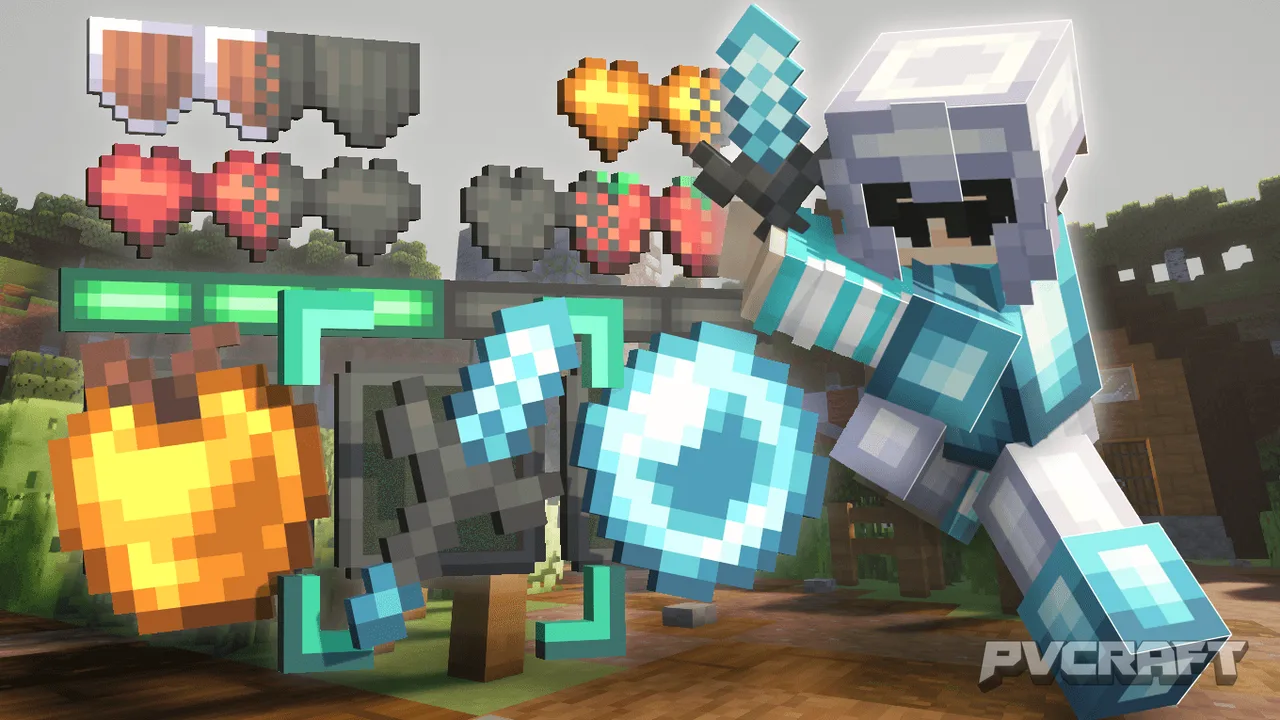
The Overture 16x texture pack is a transformative addition to Minecraft Bedrock, providing players with a visually stunning experience without sacrificing performance. Designed by Lowo404, this pack elevates the standard gameplay with meticulously crafted textures that breathe new life into every element of the game. From blocks to items and even the user interface, Overture 16x brings a cohesive aesthetic that appeals to both casual players and hardcore enthusiasts.
One of the standout features of Overture 16x is its vibrant color palette. Each block has been reimagined to showcase rich hues that make the world of Minecraft feel more alive. For instance, the lush greens of the forest biome stand out against the vibrant blues of the sky, creating a beautiful contrast that enhances exploration. Additionally, the pack introduces unique textures for every type of stone, making underground adventures visually rewarding. Players will find mining to be an even more engaging activity as they navigate through vividly detailed caves and cliffs.
The atmosphere of Overture 16x extends beyond just blocks; the skies are equally impressive. With a carefully crafted cloudy sky, players can enjoy a serene backdrop as they build and explore. This attention to detail ensures that the sky complements the gameplay experience rather than distracts from it. The aim was to create an environment that feels immersive without overwhelming the player, making it ideal for both creative building and survival gameplay.
When it comes to gameplay mechanics, Overture 16x doesn't cut corners. The texture pack includes redesigned items that enhance not just the visual experience but also the functionality. Weapons, tools, and even food items have been revamped to fit the new aesthetic, ensuring consistency across the board. For example, the swords and axes are detailed with intricate designs that make them stand out during PvP engagements, enhancing the overall excitement when battling against foes. Players can expect a smoother experience during combat, as the textures help distinguish between various weapons and armor types easily.
The armor textures are another highlight of this pack. The introduction of copper and netherite armor textures provides a fresh look that adds depth to character customization. Players can now showcase their unique style while donning their favorite sets, delivering both function and flair. The armor designs are not only visually appealing, but they also fit seamlessly into the overall theme of the pack, enhancing the immersive quality of the game.
Beyond the aesthetics, Overture 16x is optimized for performance on all devices, ensuring that even players on mobile or older consoles enjoy a smooth experience. This optimization allows for larger builds and complex environments without the lag that can accompany high-resolution textures. Players can focus on creativity and exploration rather than worrying about performance issues. With the added bonus of custom sounds included in the pack, players can fully immerse themselves in the Minecraft world as they interact with their environment.
In summary, Overture 16x is not just a texture pack; it’s an overhaul of the Minecraft experience itself. Its careful attention to detail, vibrant colors, and optimized performance make it a must-have for any Bedrock player looking to elevate their gameplay. Whether you are crafting, exploring, or battling, this texture pack enhances every aspect of Minecraft, making it more enjoyable and visually appealing. Dive into the world of Overture 16x and discover how it can transform your adventures in Minecraft Bedrock.
ad
About the Content
CHANGELOG:
- Initial release featuring enhanced textures for all blocks.
- Added custom user interface elements for an improved experience.
- Introduced updated item textures, including weapons and armor.
- Enhanced environmental textures, including skies and biomes.
- Optimized for better performance on mobile devices and consoles.
Installation
Installing the Overture 16x texture pack in Minecraft Bedrock is a straightforward process. Follow these simple steps:
1. **Download the Texture Pack**: Ensure you have the Overture 16x texture pack file saved on your device. It usually comes in a .mcpack format.
2. **Open Minecraft Bedrock**: Launch your Minecraft Bedrock Edition game.
3. **Access Settings**: Click on the "Settings" option from the main menu.
4. **Navigate to Storage**: In the settings menu, scroll down and select "Storage."
5. **Import the Texture Pack**: Tap on "Import Resource Pack" and locate the Overture 16x .mcpack file you downloaded. Click on it to import the pack into your game.
6. **Activate the Pack**: Once imported, go back to the main settings and select the "Global Resources" option. Here, find Overture 16x in your list of packs. Tap on it and select "Activate" to enable the pack.
7. **Start Your Game**: Now, you can start a new game or load an existing one to experience the new textures!
Remember to check your performance settings to ensure optimal gameplay after activating the texture pack.
Supported Minecraft Versions
1.21.132
If the download button doesn't work, click here for alternatives
If you are the original creator and would like this content removed, please submit a request through our DMCA page.