MCPE RealSource REALISTIC pack
Skip to DownloadRealSource REALISTIC pack offers an immersive visual overhaul for Minecraft Bedrock Edition, enhancing textures for a truly lifelike experience.
ad
Description
The RealSource REALISTIC pack is a texture pack specifically crafted for Minecraft Bedrock Edition, providing players with a more visually impressive experience. By replacing the default textures with realistic high-definition counterparts, this pack aims to immerse players deeper into their gameplay.
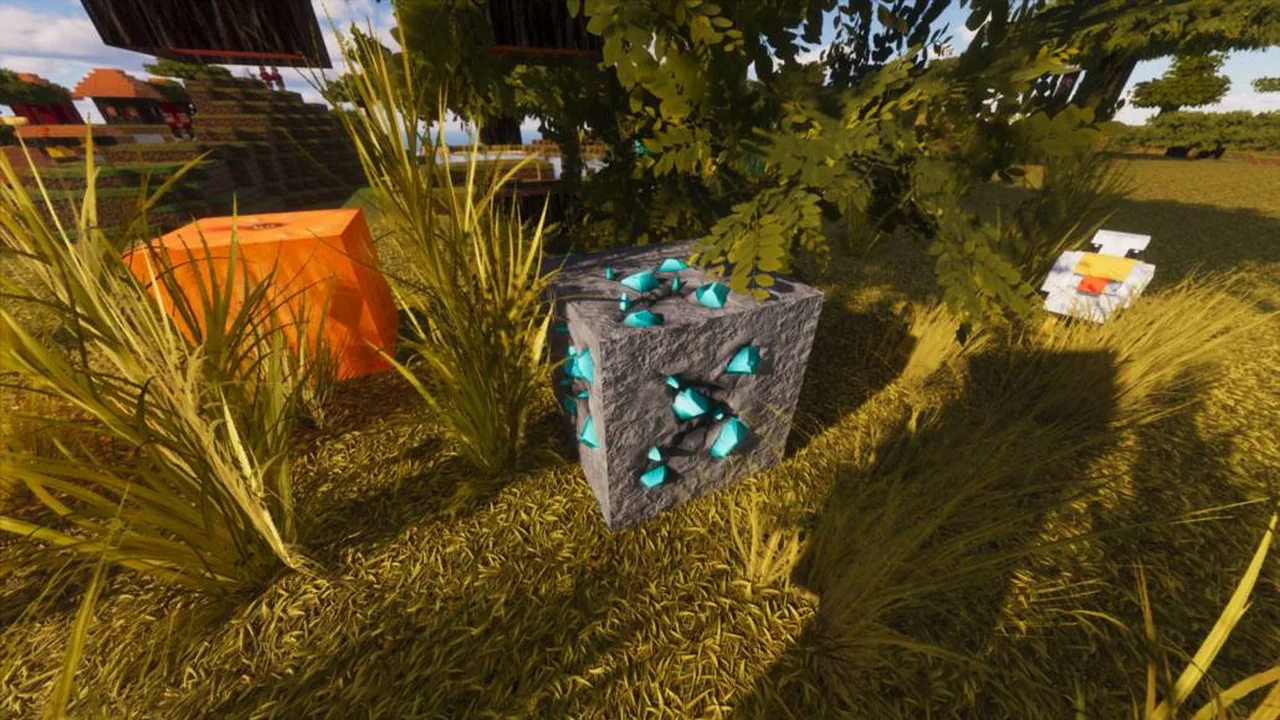
One of the standout features of the RealSource pack is its meticulous attention to detail. Textures have been designed to mimic real-world materials closely, giving environments a more authentic look. For instance, wood now has an intricate grain pattern, similar to real timber, which adds depth when building houses or structures. Additionally, stone and ores possess varying textures, making them distinguishable not just by color, but by their visual characteristics, enhancing the overall gameplay experience.
The grass and foliage textures have also received significant upgrades, making them appear lush and vibrant. Players will notice a shift in how landscapes come to life; grassy plains seem more engaging, and forests appear dense and full of life. Under sunlight, these textures react to light, casting dynamic shadows, leading to a more dynamic environment.
Water, arguably one of the most critical visual elements, has been revamped in this pack, showcasing clearer depths and realistic ripples. This updated texture behavior is particularly noticeable when swimming or fishing, as it resembles real water interactions. Moreover, during different times of the day, water surfaces react differently to light, enhancing the overall day-night cycle in the game.
Players can expect an enhanced experience in atmospheric conditions. Fog, sunlight, and shadows all work together with the new textures to create a visually stunning environment. The RealSource pack isn’t just about making things look pretty; it significantly enhances the sense of immersion while exploring or building. Players who enjoy survival gameplay can find satisfaction in the more vibrant world they inhabit, making their adventures feel more authentic than before.
Installing this pack is straightforward. Players can download the texture pack file and import it directly into their Minecraft Bedrock Edition. Once installed, the textures will apply automatically to the world settings. Players can toggle the textures in the settings menu under 'Storage' and 'Resource Packs.' The RealSource pack is compatible with most Bedrock Edition versions, ensuring a seamless integration into existing worlds or new survival maps.
However, players should note that using high-resolution packs can impact performance on lower-end devices. Those with limited hardware may experience slight lag during gameplay. Nevertheless, the trade-off for such stunning visuals can be well worth the performance considerations for many players. For new Minecraft Bedrock users or veterans seeking to revamp their world, RealSource REALISTIC pack serves as a fantastic tool to elevate the visual game experience. Whether you’re a builder, explorer, or player focused on survival, this pack provides a transformative experience that showcases the beauty of Minecraft in a way that has never been seen before.
In summary, the RealSource REALISTIC pack stands out for its high-quality textures and immersive environment, making it an essential addition for players looking to enhance their Minecraft journey. From the stunning blocks to realistic environmental interactions, it encapsulates what many players desire in an enriched gameplay experience.
ad
About the Content
RealSource REALISTIC pack transforms the visual aesthetics of Minecraft Bedrock Edition by replacing standard textures with high-definition, realistic alternatives. This pack is designed for players seeking a more immersive and visually appealing environment within their Minecraft worlds.
### CHANGELOG:
- Initial release: Introduced high-definition textures for all blocks and items.
- Enhanced wood textures for increased realism.
- Optimized grass and foliage textures for better visuals.
- Updated water textures to provide a more dynamic appearance.
- Improved lighting effects, enhancing the ambiance of different time cycles.
Installation
To install the RealSource REALISTIC pack in Minecraft Bedrock Edition, follow these steps:
1. **Download the Texture Pack**: Locate the TrueSource REALISTIC pack file and download it to your device. Ensure that it’s compatible with Minecraft Bedrock Edition.
2. **Import the Pack**: Open Minecraft Bedrock Edition. Go to the 'Settings' menu, and navigate to 'Storage'. Here, you will have the option to import resource packs. Click on 'Import' and navigate to the location where you saved the texture pack. Select the file to begin the import process.
3. **Enable the Pack**: Once imported, you will see the pack listed under 'Resource Packs'. Click the checkmark next to the RealSource REALISTIC pack to enable it.
4. **Start a New World or Edit an Existing One**: You can apply the texture pack to a new or existing world. To apply it to an existing world, go to 'Worlds', select your desired world, and tap on 'Edit'. Scroll down to 'Behavior Packs' and 'Resource Packs', and then add the RealSource pack.
5. **Adjust Settings**: Ensure your graphical settings are optimized for the best performance. Higher-resolution textures may require more robust hardware.
6. **Explore Your World**: After applying the pack, enter your world. You should now be greeted with stunning visuals across all blocks, items, and environment.
7. **Feedback and Tweaks**: If you encounter any issues, revisit the settings or adjust your performance settings to find a balance that suits your device. Enjoy the new visuals as you explore and build!
By following these steps, you should be able to transform your Minecraft experience with the RealSource REALISTIC pack, leading to a more visually rewarding adventure.
Supported Minecraft Versions
1.21
If the download button doesn't work, click here for alternatives
If you are the original creator and would like this content removed, please submit a request through our DMCA page.